
A website audit is a structured review of a website that finds what stops it from being found, used or trusted, and ranks the fixes by how much they matter. Depending on its type, it looks at search visibility, technical health, speed, usability, accessibility, tracking and security, and ends with a list of tasks the business can act on.
An “external” website audit simply means one carried out by a specialist from outside the business, often an agency or consultant with no part in building the site. The phrase is also used now and then for an audit of factors outside the site, such as backlinks, which is covered under off-page SEO.
What a website audit checks
“Website audit” is an umbrella term. Most audits focus on one or two of these areas:
- Technical SEO. Whether search engines can crawl and index the pages: redirects, broken links, duplicate addresses, the XML sitemap, robots.txt, mobile display and speed. For speed, Google’s Core Web Vitals set clear targets, such as the main content loading within 2.5 seconds.
- On-page and content SEO. Page titles and descriptions, headings, thin or duplicated pages, pages competing for the same search, and internal links.
- Off-page SEO. The sites that link to yours, how relevant and trustworthy they are, and any patterns that could look like link spam. This is the backlink profile.
- Usability (UX). Whether visitors can find what they came for and complete the next step: navigation, forms, calls to action, mobile layout.
- Accessibility. Whether people using screen readers, keyboards or zoom can use the site, measured against the WCAG standard. More in our entry on web accessibility.
- Tracking and conversion. Whether enquiries, calls and purchases are recorded in analytics, and where visitors drop out on the way. Improving that path is the work of conversion rate optimisation.
- Security and maintenance. HTTPS, out-of-date plugins and software, signs of malware, backups. Our guide on checking a site for viruses covers the first steps.
A full SEO audit usually combines the first three. A UX audit covers usability and parts of conversion. Advertising accounts, such as Google Ads, have audits of their own.
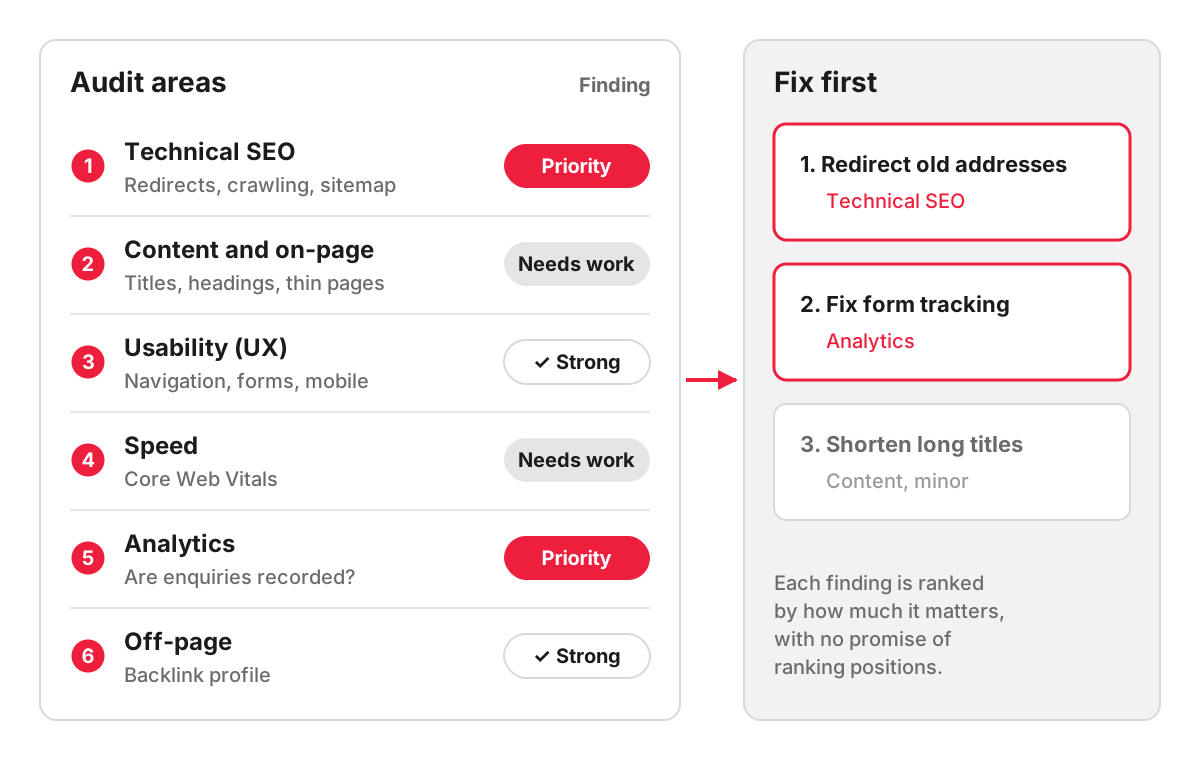
How a website audit works, step by step
Take a dental practice whose online enquiries fell after its website was redesigned. An audit would typically run like this:
- Agree the question. Here: why did enquiries fall, and what should be fixed first?
- Get access to Google Search Console, Google Analytics and the CMS, so the audit works with real data, not guesses.
- Crawl the site with a tool that visits every page, as a search engine would, and lists errors.
- Review by hand what tools cannot judge: whether the treatment pages answer patients’ questions, whether the booking form works on a phone.
- Compare before and after in Search Console and Analytics: which pages lost visits and when.
- Prioritise. In this example, the likely culprits would be old treatment page addresses that now return errors because no redirects were set up, and a booking form that stopped sending data to Analytics after the redesign. Those come before minor issues such as long page titles.
- Report and explain, so the practice knows what to fix, in what order and who should do it.
Why an outside view helps
The team that built or runs a site is often too close to it. They know where everything is, so they do not notice that visitors cannot find it, and they may have a stake in the original decisions. An outside specialist starts with no assumptions.
Google’s own page on hiring an SEO lists a review of site content or structure among the useful services an SEO can offer. The same page warns that no one can guarantee a number one ranking on Google, which is a good filter for audit offers too: an audit should promise findings and recommendations, never positions.
When to audit a website
- before a redesign or a website migration, so existing strengths are not lost;
- after a sudden drop in traffic or enquiries;
- before starting paid advertising, so the money is not spent sending visitors to pages that do not convert;
- when you take over a site from another agency or developer;
- once a year as a health check, on a site that changes often.
Automated tools or a specialist audit
Free tools such as PageSpeed Insights and the reports in Google Search Console are a good place to start, and site crawlers list hundreds of issues in minutes. What they do not do is tell you which five of those issues are costing you customers. Many automated warnings are harmless on a particular site, and some serious problems, such as a service page that answers the wrong question, never appear in a tool’s report.
How we work with website audits
We offer several audits, depending on the question you need answered. A technical SEO audit of a small website costs £210, a full SEO audit of a small website £370 and of an online shop from £690, and a UX audit from £530. You receive a task list with recommendations and a call where we go through the findings. Fixes are a separate piece of work.
FAQ
Can I do a website audit myself?
Partly. With Google Search Console, PageSpeed Insights and a free crawler, you can find broken pages, missing titles, slow pages and indexing errors on a small site. What is harder to do yourself is judge which problems matter for your business and see your own site the way a new visitor does. A useful compromise is to run the free checks first and bring the results to a specialist.
Can I get a free audit of my website?
Many agencies offer a short free review, usually as a first conversation. Ours is a free SEO express audit, which we present at a meeting and explain as we go; it is a shorter review, and the full audit is a paid piece of work. Automated tools also produce free reports, which are useful as long as you read them as a list of possible issues, not a plan.
Can ChatGPT do an SEO audit?
An AI assistant can review text you paste into it, suggest page titles and explain what an error message means. It cannot see your Search Console data, crawl every page of your site or check how real visitors behave unless that data is given to it, and it can be confidently wrong about technical details. It is useful for research and drafting, and the conclusions still need someone who knows your site and your market.
How long does a website audit take?
It depends on the size of the site and the depth of the audit. A technical review of a small brochure site takes a few hours of work, while a full audit of an online shop with thousands of products takes considerably longer. Our SEO, technical SEO and UX audits each take from 7 working days on their own, or from 14 working days for all three together. Allow extra time for access to Search Console and Analytics to be granted.
