
Internal linking means linking from one page of a website to another page on the same website: through the menu, breadcrumbs, links in the text and blocks of related articles or products. Internal links help visitors find what they need next, and they help search engines discover pages, understand what each one is about and see which pages the site itself treats as most important.
Internal linking is part of on-page SEO, and it is one of the few parts of SEO that is entirely in your hands. Links that point to a different website are external links, and when another site links to yours, that is a backlink, part of your backlink profile.
Types of internal links
- Navigation links. The main menu, which appears on every page and points to the most important sections. Our entry on website navigation covers how to plan it.
- Footer links. Secondary pages such as contact details, policies and service areas.
- Breadcrumbs. A trail such as Home › Family law › Divorce that shows where the page sits and links back up the structure.
- Contextual links. Links inside the body text, written into the sentence where they are useful. These carry the most meaning, because the words around them explain why the linked page is relevant.
- Related content blocks. “Related articles” or “You may also like” sections, often generated automatically by the CMS.
How internal links help SEO
Discovery. Google finds most pages by following links. Its guide to crawlable links says that every page you care about should have a link from at least one other page on your site. A page that nothing links to may never be found, or may be found only through the sitemap.
Meaning. The clickable words of a link, its anchor text, tell Google what to expect on the page it points to. On your own site you choose every word: a link reading “child arrangements” tells Google what the page covers, and one reading “click here” tells it nothing.
Importance. Google’s ranking systems guide says it uses systems that understand how pages link to each other to determine what pages are about, and that PageRank remains one of them. Pages linked from the home page and from many related pages are easier to reach, for crawlers and visitors alike, than pages buried five clicks deep.
Visitors. A reader who has just learned how long a divorce takes is a step away from asking for help. A link to the divorce service page at that point is useful to them and to the business.
An example: a small law firm’s site
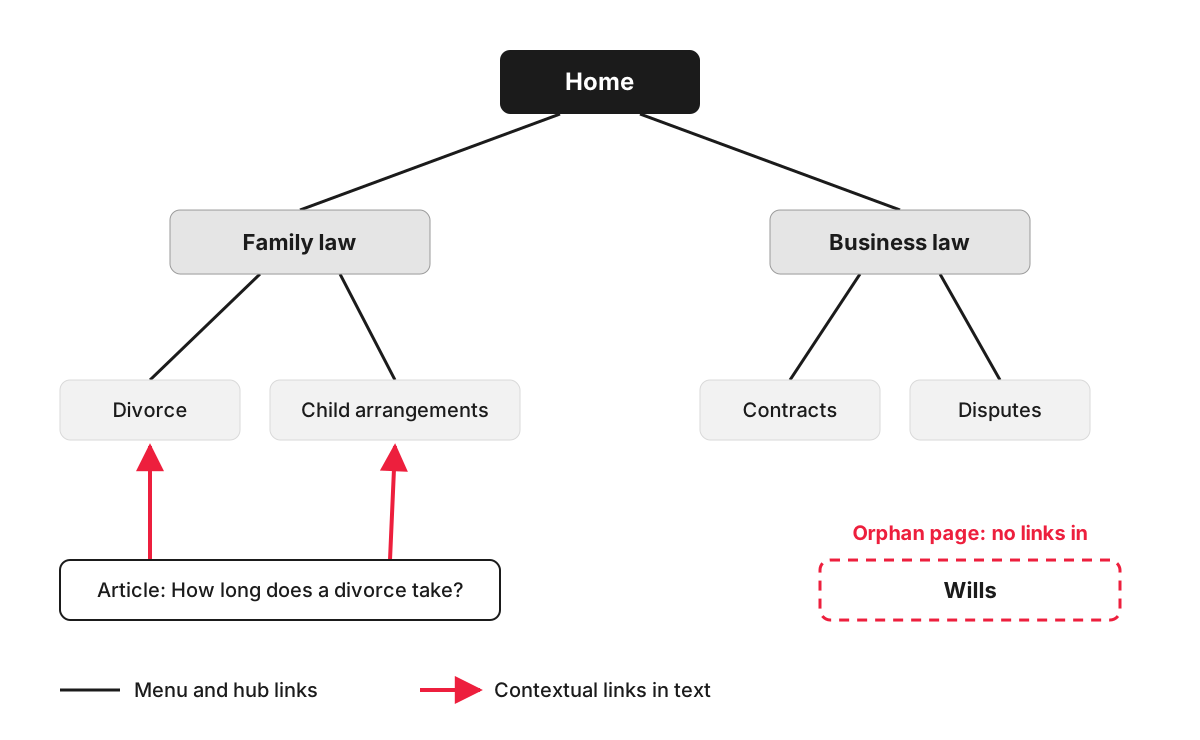
A law firm groups its services under two hub pages, Family law and Business law. The menu links to both hubs, and each hub introduces its services and links to them. A blog article answering “how long does a divorce take?” links from the relevant sentences to the Divorce and Child arrangements pages, sending both readers and search engines to the pages that turn interest into enquiries.
Meanwhile, the Wills page was added last year but never linked from the menu, a hub or any article. It is an orphan page: it exists, but there is no path to it through the site. The fix is a link from a hub page and from any article that mentions wills.
Common internal linking mistakes
- Orphan pages. Pages with no internal links pointing to them, often landing pages from old campaigns or services added in a hurry.
- Links that are not real links. Google says it can reliably crawl a link only when it is an a element with an href attribute. Buttons that navigate with JavaScript alone may work for visitors and still be invisible to the crawler.
- Vague anchors. “Read more”, “learn more” and “click here” repeated across a page tell Google nothing about where they lead.
- Links to old addresses. After a redesign or website migration, internal links often still point to redirected or deleted pages. Every redirect is an extra step for crawlers and a slower click for visitors, so links should be updated to the final address.
- Links to the wrong version of a page. Internal links that point to a URL with tracking parameters or without the trailing slash, while the canonical tag names another version, send Google mixed signals. See canonicalization.
- Too many links on one page. Google says there is no magic number of links per page, and adds that if you think it is too much, it probably is.
How to review your internal links
- Search Console. The Links report lists your most linked pages within the site. If a key service page sits near the bottom, it needs more links from related pages.
- A site crawler. Tools such as Screaming Frog show how many clicks each page is from the home page, which pages have no internal links and which links lead to redirects or errors. Comparing the crawl with your XML sitemap reveals orphan pages.
- A content map. For each main service or product page, list the articles and pages that should link to it, and check they do.
How we work with internal linking
A technical SEO audit looks at how search engines move through your site, and internal links are a large part of that, along with redirects and duplicate pages. For a small website it costs £210, presentation call included, and the result is a task list with a recommended fix for each problem. Putting the fixes in place is separate work, which our development team can take on.
FAQ
What is a pillar or hub page?
It is a page that gives an overview of a broad topic, such as Family law, and links to the detailed pages on each part of it, which link back. The term “pillar page” is more common in content marketing, “hub page” in site structure, and the idea is the same: group related pages so that people and search engines can see how they fit together.
How many internal links should a page have?
There is no fixed number. Link wherever the reader would genuinely want to go next, and give each important page links from several related pages. A long guide may naturally contain a dozen contextual links; a short service page may need only a few.
Should internal links open in a new tab?
Usually not. Visitors expect a link to another page on the same site to open in the same tab, and the back button then works as they expect. Opening a new tab is more common for external links and documents such as PDFs.
Should internal links be nofollow?
No. Google’s guide to qualifying outbound links describes nofollow as a value for links to other sites that you would rather Google did not associate with yours, and advises against using it for links within your own site. On your own pages it only makes it harder for Google to follow the site’s structure. To keep a page out of search, use a noindex tag on that page.
