
Anchor text is the visible, clickable text of a link. Visitors use it to decide whether to click, and search engines read it as a hint about what the linked page is about. In the sentence “see our boiler servicing prices”, where the last three words are the link, “boiler servicing prices” is the anchor text.
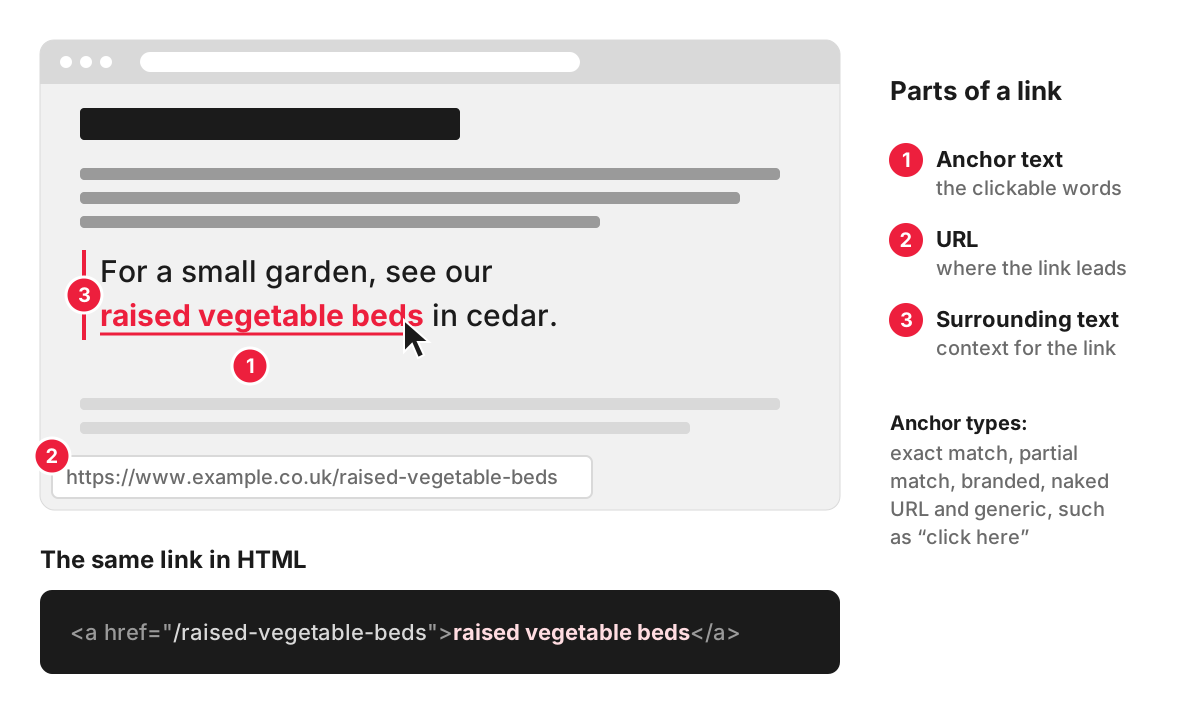
Types of anchor text, with examples
Suppose a garden centre has a category page for raised vegetable beds. Links pointing to that page could use any of these anchors:
- Exact match – the search phrase the page targets, word for word: “raised vegetable beds”.
- Partial match – the phrase inside a longer, natural wording: “cedar raised vegetable beds for small gardens”.
- Branded – the garden centre’s own name, the way people write it in a review or a local news story.
- Naked URL – the address itself: “www.example.co.uk/raised-vegetable-beds”.
- Generic – words that say nothing about the page: “click here”, “this website”, “read more”.
- Image links – when a picture is the link, Google uses the image’s alt text as its anchor.
The term is sometimes confused with an anchor link, which jumps to a section further down the same page. The clickable words of that link are anchor text too.
Google’s guidance on links asks for anchor text that is descriptive, reasonably concise and relevant both to the page it sits on and to the page it points to. Generic anchors such as “click here” tell neither the reader nor the search engine what to expect.
Internal and external links
Internal links connect pages of your own site: from a blog post to a service page, from a product to its category. You choose every word, so the anchor can simply name what the visitor will find, such as “dental implants” or “delivery and returns”. Descriptive internal anchors help Google understand which page covers which topic and help visitors move around. Internal linking covers how to plan them across a site.
External links, often called backlinks, point to your site from other websites. When another site links to you on its own initiative, the writer picks the words, and most such links use your business name, your web address or a natural phrase. Links that are bought, swapped or arranged are different: here someone on your side chooses the anchor, and this is where the risks start.
Can anchor text hurt your rankings?
Yes, when external anchors look arranged. Google’s spam policies name links with optimised anchor text in articles, guest posts or press releases distributed on other sites as an example of link spam. A site that has dozens of links from other websites all saying “cheap raised beds uk”, all pointing to one category page, has a profile that no real audience would produce.
The effect can range from Google simply ignoring those links to a manual action, which appears in the Manual actions report in Search Console with the label “Unnatural links to your site”. In both cases the money spent on the links is lost, and recovering can mean removing links or asking Google to disregard them through its disavow tool.
Internal links carry far less of this risk, because Google expects a site to name its own pages clearly. The usual problem with internal anchors is the opposite: menus and buttons that say “learn more” and give no hint of where they lead.
Choosing anchors for links from other sites
If you pay for publications, or an SEO provider builds links for you, these are the questions worth asking:
- Which pages will the links point to, and with what words? Ask to see the plan before anything is published.
- Does the mix look like real mentions? Branded anchors, web addresses and natural phrases should make up most of it, with descriptive partial-match anchors where they fit the sentence.
- Are links spread across pages? A profile in which every link goes to one money page, or only to the home page, looks unnatural from both ends.
- Would the sentence make sense to a reader? An anchor forced into an article that has nothing to do with it is a warning sign on its own.
- Are paid links labelled? Google requires links that were paid for to be marked in the code, preferably with the rel=”sponsored” attribute.
You can review the result yourself: the Links report in Search Console shows the most common linking text pointing to your site.
How we plan anchors for a site
In our link building work, before planning new links we look at the existing spread of anchors and target pages, so the profile does not lean on exact-match anchors to one page. Paid publications are marked as sponsored, as Google requires, and guest posts are published on UK sites.
FAQ
How can I create anchor text?
In HTML, anchor text is the text between the opening and closing tags of a link: <a href="https://www.example.co.uk/raised-vegetable-beds">raised vegetable beds</a>. Google can follow links reliably when they are written as an a element with an href attribute. In a CMS such as WordPress, you select the words in the editor, click the link button and paste the address, and the selected words become the anchor text.
How long should anchor text be?
Usually a few words: enough to name what the reader will find. A whole sentence as a link is hard to scan, and a single word such as “here” says nothing. A useful test is whether the anchor makes sense out of context, because assistive technology can give users a list of the links on a page, and a list of five “read more” links is useless.
Can I change the anchor text of a link on another website?
Only the owner of that site can change it. If a link uses an old business name or wording that misdescribes your page, you can ask the editor to update it. For publications you pay for, agree the anchor and the target page before the article goes live, since changing it afterwards depends on the publisher.
Can I use the same anchor text for different pages?
On your own site, it is better not to. If “garden furniture” links to a category page in one place and to a blog post in another, readers cannot tell which page they will land on, and search engines get a mixed signal about which page covers the topic. Give each page its own descriptive anchor and use it consistently.
