
A content management system (CMS) is software that lets you add and edit the pages, text, images and products on a website through an admin panel, without writing code. The CMS stores the content and the site’s templates display it, so a new article, a price change or a new team photo can go live without a developer.
Examples of content management systems
- WordPress. Open-source software that you install on your own hosting. It runs blogs, service business websites and, with the WooCommerce plugin, online shops. Thousands of themes and plugins add features, and the trade-off is regular updates to keep everything secure. More in our entry on WordPress.
- Shopify. A hosted platform built for online shops, paid by monthly subscription. Hosting, checkout and payments are handled for you; extra features usually come as apps, many with their own monthly charge. Our guide to how Shopify works goes into more detail.
- Website builders such as Wix and Squarespace. The editor, templates and hosting come as one package. They are quick to start with, but the design and functions are limited to what the builder offers, and moving to another platform later usually means rebuilding the site.
- Custom CMS. An admin panel built around one business’s content and processes, typically on a framework such as Laravel. It suits sites with unusual data, complex integrations or several sites managed together.
What you can do in a CMS without a developer
In a well-built CMS, the day-to-day running of the site is yours:
- edit text and images on existing pages;
- publish blog posts, news, case studies and team profiles;
- add products, change prices and update stock;
- create new pages from the templates the site already has;
- edit the page title and description that appear in Google;
- give colleagues their own logins with limited rights, so an editor can publish articles without access to settings.
Take a physiotherapy practice that adds a new treatment. Its practice manager can create the treatment page from the existing service template, add prices and photos, and publish it the same afternoon. If the practice later wants online booking connected to its practice management software, that is new functionality and needs a developer.
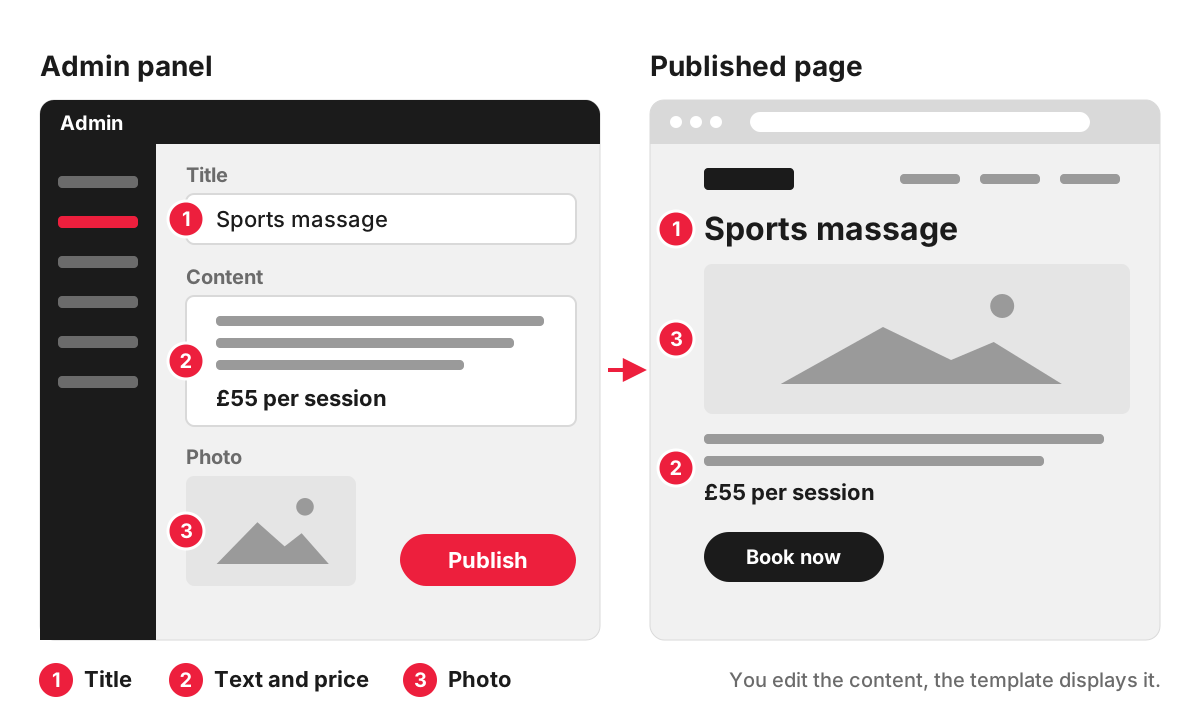
Generally, anything the templates were designed for you can do yourself. New page layouts, new features, integrations with other systems and design changes beyond the templates are development work.
CMS or CRM: what is the difference?
A CMS manages what visitors see on your website. A CRM (customer relationship management system) manages your contacts and sales: who enquired, what they asked for, which quote they received and when to follow up. HubSpot, Salesforce and Pipedrive are well-known CRMs.
The two often work together. When someone fills in the contact form on the website, the enquiry can be sent straight into the CRM with the page they came from, so nobody retypes it from an email. A few products offer both: HubSpot, for example, sells its CMS, Content Hub, as part of the same customer platform as its CRM.
Choosing a CMS for a business website
Start from what the site has to do, then match the platform to it:
- What is the site for? Presenting services and publishing articles, selling products online, or running a process such as bookings, quotes or a client area.
- Who will update it, and how often? A busy team publishing every week needs an editor that is simple to use and hard to break.
- What does it need to connect to? A CRM, accounting software, a booking system or a stock database can rule some platforms in or out.
- What will it cost to run? Hosting, subscriptions, paid themes, plugins or apps, and the time spent on updates all add up over the years.
- Where will the business be in three years? More products, more languages or a second brand each place different demands on the system.
As a rough guide, a service business with a blog is usually well served by WordPress, an online shop with a standard checkout by Shopify, and a business with its own workflows, several sites or heavy integrations by a custom build. Because our team handles website development on WordPress, Shopify or Laravel, we can recommend the platform that suits the site’s job, including when the simpler option is enough.
Who owns the website and its content?
Ownership depends on the platform and on the contract with whoever builds the site.
On self-hosted WordPress or a custom system, the code, the content and the database can all be yours outright. On hosted platforms such as Shopify, the content and customer data belong to you and can be exported, while the platform itself stays the provider’s, and the site runs on their terms and pricing.
Whatever the platform, check four things before launch:
- the domain is registered in your business’s name;
- the hosting or platform account is yours, with the developer added as a user;
- you have an administrator login with full rights;
- the contract says who owns the code and the design.
On the sites we build, you own the code, content and accounts, and we provide documentation.
FAQ
What are the most popular CMS platforms?
According to W3Techs, which tracks the technology behind websites, the five most used CMSs on 30 October 2026 were WordPress (39.5% of all websites), Shopify (5.3%), Wix (4.2%), Squarespace (2.4%) and Joomla (1.1%). On 32.1% of websites it finds no CMS at all. Popularity means a large pool of developers and plugins, but says nothing about which system suits your site.
What is a headless CMS?
A headless CMS stores and manages content but has no website templates of its own. The content is sent through an API, often a REST API, to a front end that developers build separately, such as a website, a mobile app or a screen in a shop. It suits businesses that publish the same content in several places, and it needs more development work than a traditional CMS.
Can I switch to a different CMS later?
Yes, as a website migration. Pages, images, products and users move to the new system, and every address that changes needs a redirect. Google’s guidance on site moves asks you to map each old URL to its new one and set up permanent (301) redirects, and notes that these redirects do not cause a loss in PageRank.
Do I need a CMS for a small website?
Not always. A site of a few pages that rarely changes can be built without one, and each change then goes through a developer. Once you want to publish news, change prices or add services yourself, a CMS is the simpler choice.
