
Web hosting is a service that stores your website’s files and data on a server connected to the internet and delivers them to visitors’ browsers whenever someone opens a page. You rent space and computing power from a hosting company, usually by the month or year, so your site stays online around the clock without you running a server yourself.
How web hosting works
A web server is a computer that holds a website’s files and software that answers requests for them. MDN’s explanation of web servers separates two kinds:
- a static server sends stored files to the browser as they are, which suits a small brochure site built from plain HTML;
- a dynamic server adds an application layer and a database, so pages are put together at the moment someone requests them.
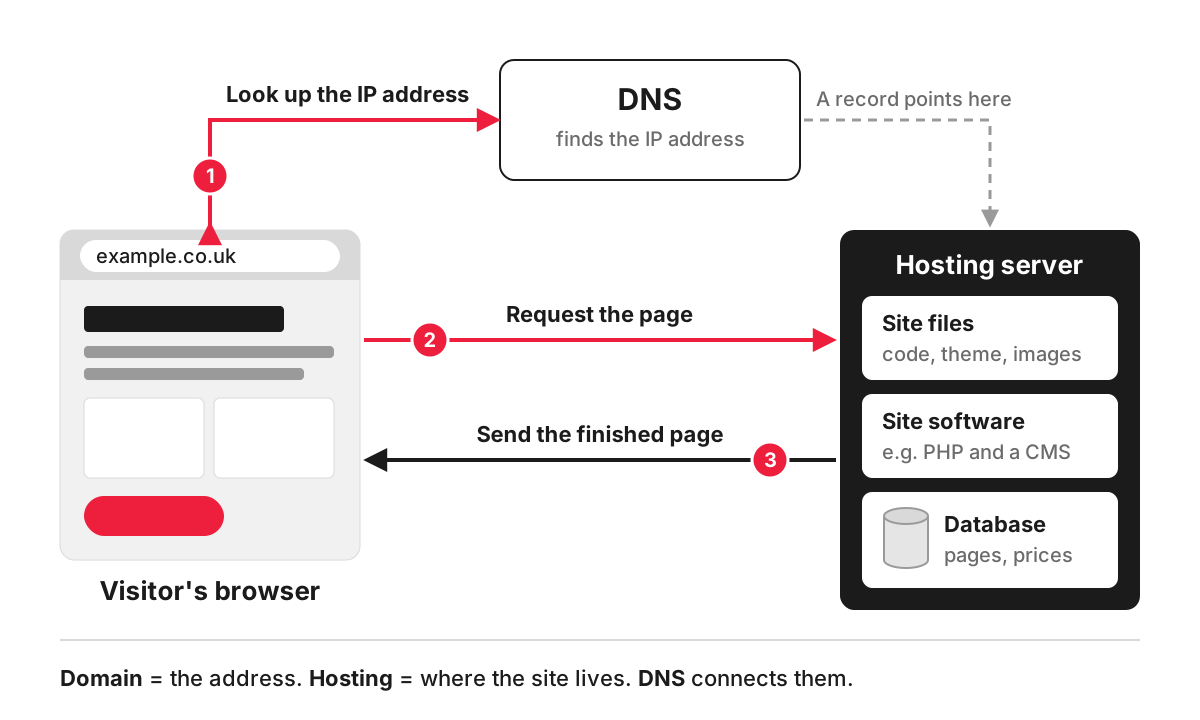
Most business websites are dynamic. Take a dental practice running WordPress. When a patient opens the “Implants” page, the server runs WordPress, fetches the page text and prices from the database, combines them with the theme and sends the finished page back. To do that, the server needs the software the CMS asks for: WordPress currently recommends PHP 8.3 or greater, MySQL 8.0 or MariaDB 10.11 or greater, and HTTPS support.
Hosting and the domain are separate services. The domain is the address, the hosting is where the site actually lives, and DNS records connect one to the other.
Types of web hosting
- Shared hosting. Many websites share one server and its resources. It is the cheapest option and fine for a small site with modest traffic, but a busy neighbour on the same server can slow yours down.
- VPS (virtual private server). One physical server is divided into isolated virtual machines, each with guaranteed memory and processing power. It suits growing sites and custom applications that need specific software.
- Dedicated server. A whole machine for one site or business. It gives full control and capacity, and needs someone to manage it.
- Cloud hosting. The site runs on resources spread across many machines at a provider such as AWS or Google Cloud, so capacity can be added as traffic grows.
- Managed hosting. Any of the above with the provider looking after server updates, security patches, backups and caching. Managed WordPress hosting is a common example.
- Platform hosting. Hosted platforms such as Shopify, Wix and Squarespace include hosting in the subscription, so there is no separate plan to choose, and also no choice of server.
What your hosting affects
Speed. Every page starts with the server’s response. Google’s web.dev guide to Time to First Byte treats 0.8 seconds or less as a good result, and a slow server makes that hard to reach however well the site is built. Server-side caching and enough memory and processing power make the biggest difference.
Availability. A cheap plan that goes offline during a sales campaign costs more than it saves. Look at what the provider commits to and how it tells you about outages.
Security. Up-to-date server software, an SSL certificate for HTTPS, a firewall and isolation between accounts on shared servers are the basics.
Backups. Ask how often the host takes backups, how long it keeps them and how quickly it can restore one. Keep your own copies as well.
Where your data is stored. If your site collects personal data through forms, bookings or orders, the location of the server matters for UK GDPR. The ICO’s guide to international transfers explains when sending personal information to an organisation outside the UK, or giving it access, counts as a restricted transfer with extra rules.
How to choose hosting for a business website
Start from what the site has to run, then compare plans:
- The platform. WordPress, a Laravel application, a static site or an online shop each have different needs.
- Traffic and peaks. A local trades site and a shop running seasonal ads need very different capacity.
- Who manages the server. If nobody on your side will apply updates, pay for managed hosting or a maintenance agreement.
- Support. Check how you reach support and how quickly it responds.
- Moving out. Make sure you can download all your files and the database at any time, so you can move to another host when you need to.
Hosting is quoted separately from our website development work. When we prepare an estimate, we include it as an ongoing cost of £10-£200 a month depending on the site, so you see the full cost of running it before you start. Whoever pays the bill, the hosting account should be in your business’s name: on the sites we build, you own the code, content and accounts, and we provide documentation. If you are planning a new site, raise hosting at the start of the web development project, because the platform and the server it needs are best chosen together.
FAQ
Can I host a website for free?
Some website builders and platforms offer free plans, usually with their branding on the site, a subdomain in place of your own domain and limited features. They are fine for testing an idea. For a business website, paid hosting gives you your own domain, better speed, support and control over your data.
Does it matter where my web host’s servers are?
For search, less than people think. Google’s guidance on sites for different countries lists “server location irrelevant” among the advantages of a country-code domain such as .co.uk. Location matters more for speed, as a server close to your visitors answers faster, and for data protection, as explained above.
What is the difference between hosting and a CMS?
Hosting is the server where your site runs. A content management system is the software on that server that you log into to edit pages. WordPress is a CMS that needs hosting; Shopify is a platform that includes both.
How do I move my website to a new host?
Copy the files and the database to the new server, test the site there, then point the domain’s DNS records at the new server and keep the old plan running until the change has spread. If the addresses of your pages change along the way, it becomes a website migration and needs redirects. Our guide to transferring a site to another CMS, hosting or domain covers the steps.
