
A cache is a store of ready-made copies of data, kept so they can be reused quickly without being fetched or built again. On a website, caching keeps copies of pages, images and other files in the visitor’s browser, on the server or on a network of servers close to the visitor, which makes pages load faster and takes load off the server.
Computers use the same idea elsewhere: a processor has its own cache memory, and phone apps keep caches of the content they show. This page is about caching on websites, the kind that affects your visitors and your search performance.
How caching works on a website
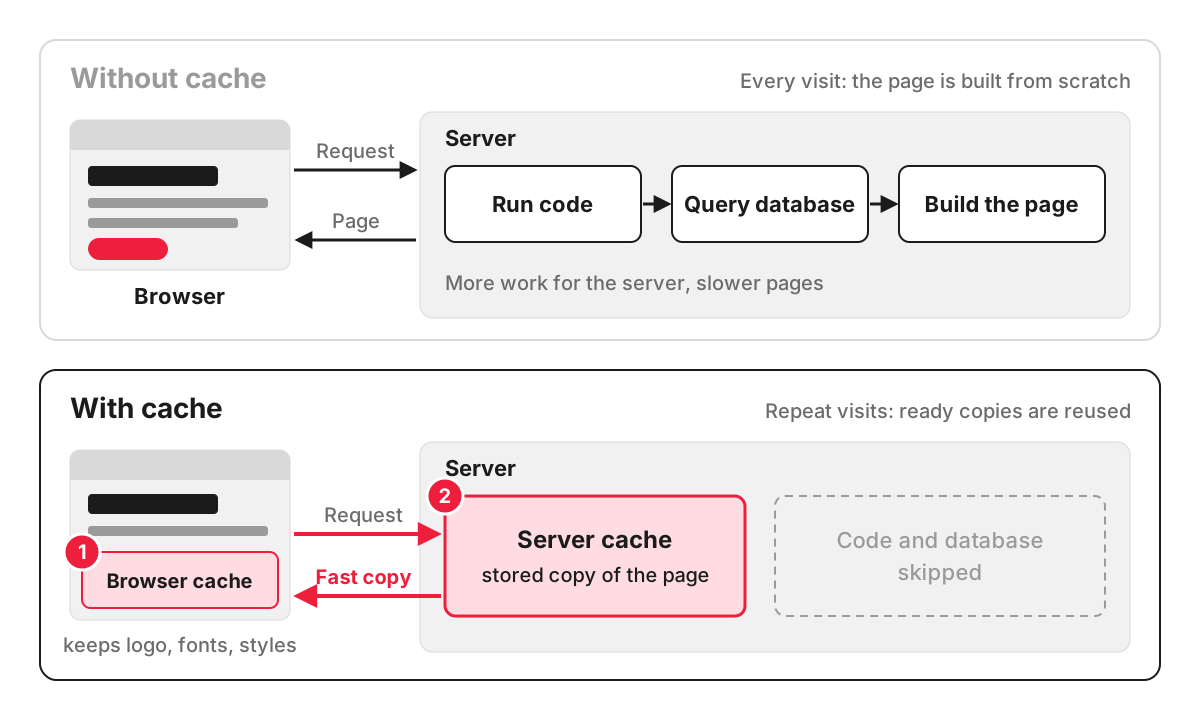
Without caching, every visit makes the server do the full job. On a WordPress or Laravel site, that means running backend code, querying the database, assembling the page and sending every image and style file across the internet. With caching, results that do not change between visits are saved and served from the copy.
Take an online shop selling garden furniture. Its “Outdoor dining sets” page shows the same products, prices and photos to everyone for hours at a time. A server cache stores the finished page after the first visit and serves the copy to the next thousand visitors in a fraction of the time. Each visitor’s browser keeps the logo, fonts and style files, so the second page they open downloads only what is new. The basket and checkout are left out of the cache, because they are different for every customer.
The main types of website cache
- Browser cache. The visitor’s browser saves files it has already downloaded and reuses them on the next page or the next visit. MDN’s guide to HTTP caching calls this a private cache, because it belongs to one user.
- Page cache. The server saves complete pages as static files, so the CMS does not rebuild them for every visitor. On WordPress this is usually done by a caching plugin or by the hosting; the WordPress caching guide names W3 Total Cache, WP Super Cache and Cache Enabler as examples.
- Object cache. The application saves the results of slow work, such as a heavy database query or a call to another system, in fast memory. Laravel’s cache documentation describes storing this kind of data in Redis or Memcached so it can be retrieved quickly on later requests.
- CDN cache. A content delivery network keeps copies of your files on servers in many locations and answers each visitor from the nearest one. MDN’s definition of a CDN notes that this makes service faster and less affected by high traffic.
How a website tells the browser what to cache
The server attaches instructions to each file in an HTTP header called Cache-Control. Two typical examples:
Cache-Control: public, max-age=31536000, immutable
Cache-Control: no-cache, private
The first suits a logo or a style file whose name changes with each new version: any cache may keep it for a year. The second suits an account page: only the visitor’s own browser may keep it, and it must check with the server for a newer version before every reuse. In MDN’s terms, no-cache allows storing but requires a check, while no-store forbids storing at all.
Why caching matters for a business site
Speed is the visible part. Pages served from a cache load faster, which visitors notice most on a phone with a weak signal. The less visible part is capacity: a cached site handles a spike from an email campaign or a TV mention on the same hosting plan that would otherwise struggle.
Common caching problems
- Visitors see an old version after an update. A file was cached for a long time under the same name. The usual fix, which MDN calls cache busting, is to add a version or a content fingerprint to file names, so every change creates a new address.
- Personal data in a shared cache. If a page with someone’s name, basket or order is stored in a server or CDN cache, another visitor can be served it. MDN warns that a cookie alone does not make a response private; the page has to be marked private or excluded from the cache.
- Two caching layers fighting. A caching plugin, the host’s cache and a CDN each holding different copies make changes appear at random. One layer should be in charge, with clear rules for clearing the others.
- Testing while logged in. Many CMS caches skip logged-in users, so the site owner sees the fresh page and visitors see the cached one. Check changes in a private browser window.
How we work with caching
Databases and caching are part of how we plan a site for speed and stability as traffic grows, and speed optimisation is included in the price of our business card and corporate websites. For a site that is already live, slow server responses and caching mistakes are among the things a technical SEO audit checks. For a small website the audit is £210 and ends with a task list and a recommendation for each fix, which our developers can then carry out as separate work.
FAQ
What does clearing your cache do?
It deletes the copies of websites your browser has saved. The next time you open those sites, everything downloads again, so pages load a little slower at first. It is a quick fix when a site looks broken or shows an old version after an update.
Will I lose anything if I clear my cache?
Clearing the cache alone does not delete passwords, bookmarks or saved form details. Clearing cookies is a separate option in most browsers, and that one does sign you out of websites. Check which boxes are ticked before you confirm.
What is the difference between cache and cookies?
The cache stores copies of files, such as images and pages, to make sites load faster. Cookies store small pieces of information about you and your visit, such as a login session, a basket or your consent choices. A website uses both, for different jobs.
Should a website owner clear the server cache after making changes?
Usually the CMS or caching plugin clears the affected pages automatically when you publish. If a change still does not show, clear the page cache in the plugin or hosting panel, then the CDN cache if you use one, and then check in a private browser window.
