
A database is an organised collection of data stored on a computer so that software can find, add, change and delete it quickly. On a website, the database holds everything that changes: pages and articles, products and prices, customer accounts, orders, bookings and form submissions. The site’s code reads from it each time someone opens a page and writes to it whenever someone signs up, books or buys.
The software that runs a database is called a database management system. The MySQL manual puts it simply: a database is a structured collection of data, and the database management system is what lets you add, access and process it.
How a website uses a database
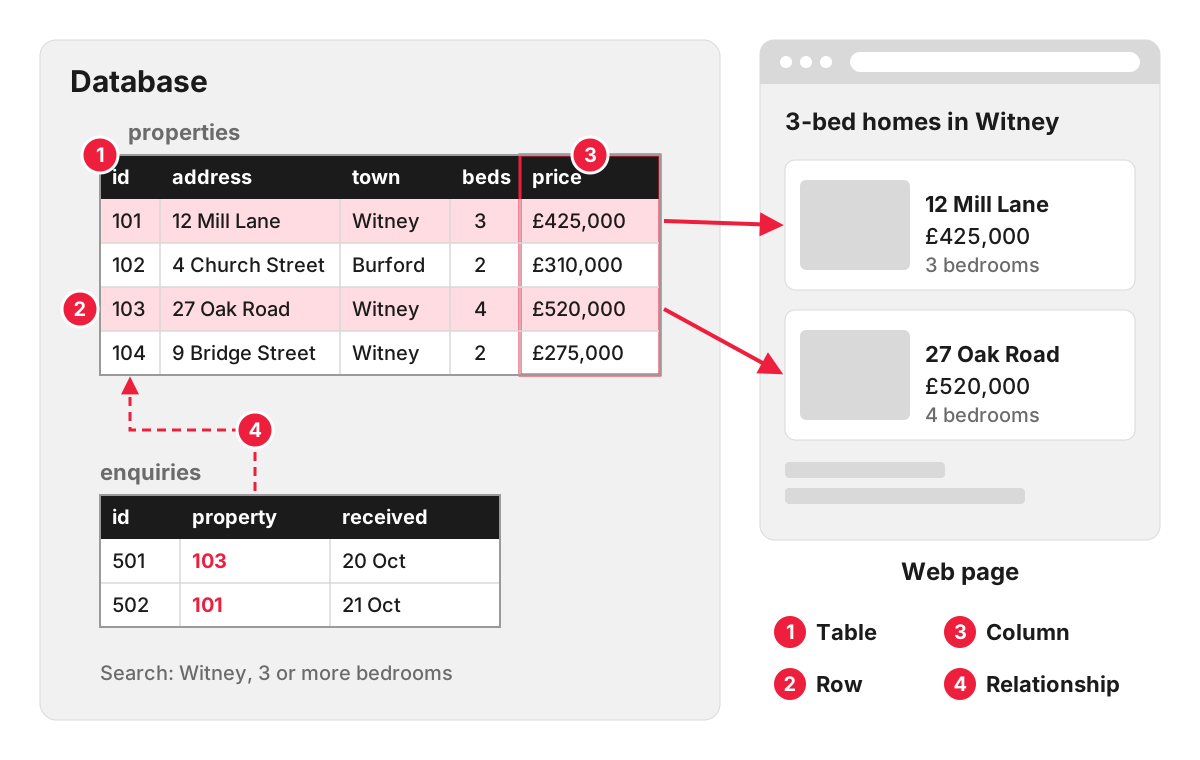
Take an estate agent’s website. Each property is stored as a record with the same set of fields: address, town, price, number of bedrooms, photos, status. When a visitor filters for three-bedroom houses in Witney, the website sends the database a request in SQL, the standard language for this, and turns the answer into a page of results:
SELECT address, price, bedrooms
FROM properties
WHERE town = 'Witney' AND bedrooms >= 3 AND status = 'for sale'
ORDER BY price;
Nobody at the agency writes this by hand. Staff add and edit properties in the admin panel of the CMS, and the website’s backend code builds the queries. When a property is sold, one change in the database updates the listing, the search results and the “recently sold” block at the same time.
Tables, rows and relationships
Most websites use a relational database. The MySQL manual describes it as keeping data in separate tables, with relationships defined between them.
- A table holds one kind of thing: properties, customers, orders.
- A row is one item in it: one property.
- A column is one detail about every item: the price.
- A relationship links tables: each order row records which customer placed it, so the customer’s details are stored once and not copied into every order.
Common relational databases include MySQL, MariaDB, PostgreSQL, SQL Server and SQLite, which are also the five that Laravel supports out of the box. Other kinds, often grouped as NoSQL, store data as documents, key-value pairs or graphs, and suit particular jobs such as very large volumes of loosely structured data or fast caches.
Where you will meet a database on your own site
- WordPress keeps posts, pages, users, comments and settings in a MySQL or MariaDB database; its requirements page currently recommends MySQL 8.0 or MariaDB 10.11 or greater. More in our entry on WordPress.
- Shopify and other hosted platforms run the database for you. You work with the data through the admin panel and exports, and never touch the database itself.
- Custom applications built on a framework such as Laravel have a database designed around the business: its products, prices, customers and processes. Developers usually work with it through an object-relational mapper, such as Laravel’s Eloquent, which turns tables into code objects.
When a website shares data with other systems, such as a CRM, an accounting package or a mobile app, it typically does so through an API, often a REST API, and not by giving those systems direct access to the database.
Why the database matters to a business
Speed. A slow page is often a slow query. Indexes on the columns people search by, and caching results that rarely change, keep pages fast as the data grows.
Security. The database holds the most sensitive part of the site: customer details, orders, passwords stored as hashes. Access should be limited, and every form that writes to it should be protected against malicious input.
Backups. Content and orders change daily, so the database needs its own regular backups, separate from the site’s files.
Personal data. If the database stores personal data, UK GDPR applies to it. The ICO’s guidance on storage limitation says you must not keep personal data for longer than you need it, so old enquiries and accounts should be reviewed and deleted or anonymised on a schedule.
Ownership. The database is a business asset. Make sure you can get a full copy of it, in a standard format, whenever you ask.
How we work with databases
On our website projects, templates, the data structure and the CMS content model are defined and agreed with you before development starts, so the database reflects how your business actually works and you can see where every piece of information will live. For businesses whose data or processes do not fit a standard CMS, our web development team builds custom applications on Laravel.
FAQ
What are the main types of database?
The two broad families are relational (SQL) databases, which store data in linked tables, and NoSQL databases. The four NoSQL types usually listed are document, key-value, wide-column and graph databases. Most business websites run on a relational database, sometimes with a key-value store such as Redis alongside it for caching.
Is a spreadsheet a database?
Not really. A spreadsheet can hold a simple list, and many businesses start there. A database enforces structure and rules, lets many people and systems use the data at once without overwriting each other, links related records and stays fast with millions of rows.
Where is my website’s database stored?
Usually on your hosting server or on a separate database server at the same provider. On hosted platforms such as Shopify, it sits on the platform’s own infrastructure. Your developer or host can tell you where it is and how it is backed up.
What is the difference between a database and a CRM?
A database is the underlying store; a CRM is a complete application, with its own database, built for managing contacts, deals and follow-ups. Your website and your CRM each have their own database, and an integration passes enquiries from one to the other.
