
A REST API is a way for two pieces of software to exchange data over the web, using ordinary web addresses and standard HTTP requests. Each kind of data, such as products, orders or customers, has its own address, and the other system asks for it, adds to it, changes it or deletes it with a standard request. The answer usually comes back in JSON, a simple text format that almost every programming language can read.
API stands for application programming interface: an agreed set of requests one system accepts from another. REST, short for Representational State Transfer, is a widely used set of rules for designing those requests; MDN describes REST as a group of architectural constraints that make distributed systems efficient, reliable and scalable.
How a REST API works
Think of a REST API as a waiter with a fixed menu. The menu lists what you can ask for and the exact way to ask. The kitchen, meaning the other system’s database and code, stays out of sight, and you only ever receive what the menu allows.
Three ideas make an API “RESTful”:
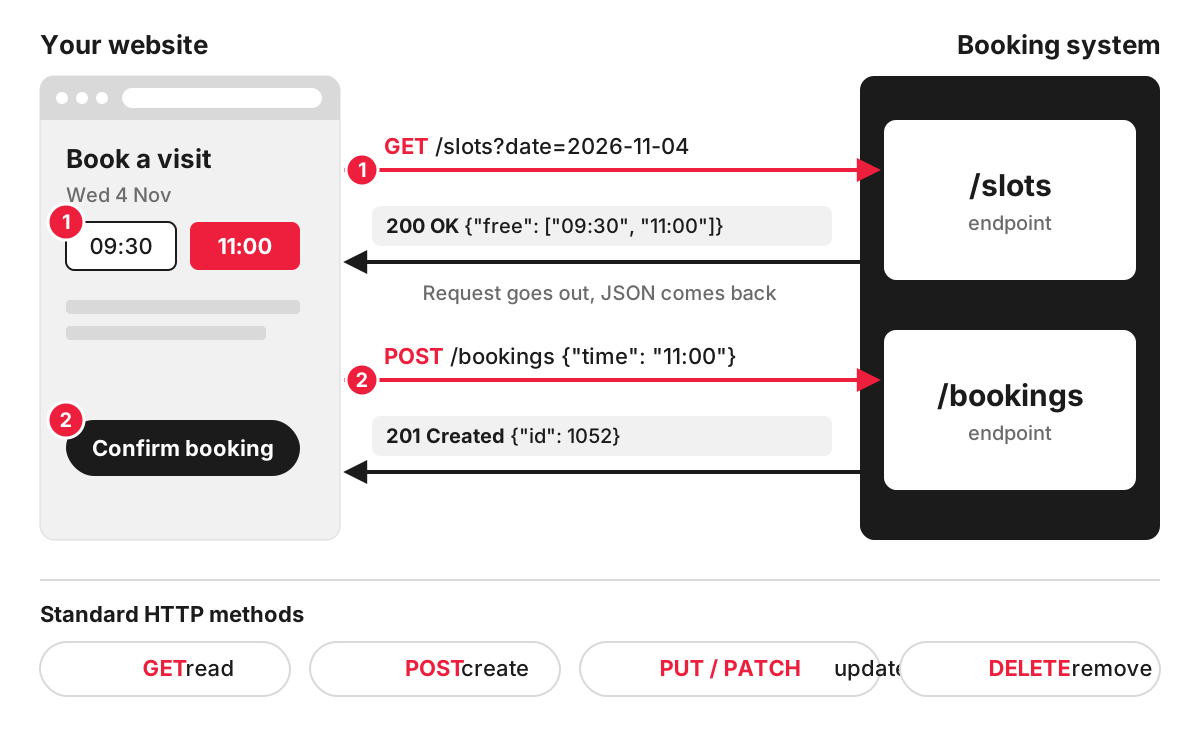
- Resources at addresses. Each type of data has a URL, called an endpoint, such as /products or /orders/1052.
- Standard methods. The request says what to do using the HTTP methods every web server understands: GET to read, POST to create, PUT or PATCH to update, DELETE to remove.
- Self-contained requests. Each request carries everything the server needs, including a key or token that proves who is asking. The server does not have to remember the previous request.
A real example: reading posts from a WordPress site
Every modern WordPress site has a built-in REST API. The WordPress REST API handbook describes it as an interface that lets applications interact with your site, and its reference shows that posts can be listed with a GET request to /wp-json/wp/v2/posts:
GET https://example.co.uk/wp-json/wp/v2/posts?per_page=1The response is JSON, shortened here:
[
  {
    "id": 214,
    "date": "2026-10-20T09:00:00",
    "link": "https://example.co.uk/blog/winter-opening-hours/",
    "title": { "rendered": "Winter opening hours" }
  }
]
A mobile app, a screen in a shop window or another website can use that response to show your latest news without anyone copying it across. Reading public posts needs no login; creating or editing them through the API requires authentication.
Where businesses use REST APIs
Most integrations between a website and other business software go through an API, very often a REST API:
- an online shop sends each order to the accounting software and the warehouse system;
- a website enquiry form creates a lead in the CRM, with the page it came from;
- a garden centre’s website takes stock levels from the till system, so sold-out plants show as unavailable;
- a booking page checks free slots in the practice management software;
- a mobile app shows the same products and prices as the website.
The same applies inside one product. A website can have its backend and its front end built separately and connected by an API, which is how a headless CMS works.
Platforms change their APIs over time, and integrations have to keep up. Shopify, for example, states that its REST Admin API became a legacy API on 1 October 2024 and that all new public apps must be built with its GraphQL Admin API from 1 April 2025.
What to check before you commit to an integration
- Documentation. Is the other system’s API documented, and does it cover every piece of data you need?
- Access and keys. Who holds the API keys, what can each key do, and how are they stored? A key with full access sitting in a shared document is a risk.
- Limits and costs. Many APIs cap the number of requests per minute or charge for higher usage.
- Failure handling. What happens to an order if the accounting system is offline for an hour? A good integration queues the data and retries.
- Change. APIs get new versions and old ones are retired. Someone has to watch for announcements and update the integration.
- Personal data. If customer details pass between systems, the transfer has to fit your privacy notice and data protection obligations.
How we build integrations
We build the integrations businesses rely on, such as CRM, payments and product feeds, and our services include business process automation and AI features in custom web applications. For custom platforms and secure backends we use Laravel, whose Sanctum package issues API tokens with defined abilities for single-page apps, mobile apps and simple token-based APIs. If your project depends on connecting several systems, have a look at our Laravel development services.
FAQ
What is the difference between an API and a REST API?
API is the general term for any defined way one piece of software talks to another. A REST API is one style of web API, built around resource addresses and standard HTTP methods. Other styles include GraphQL, SOAP and webhooks, so every REST API is an API, but not every API is RESTful.
What is the difference between REST and GraphQL?
A REST API has many endpoints, each returning a fixed shape of data. A GraphQL API usually has a single endpoint, and the request specifies exactly which fields it wants, which can save several round trips. Both are common; the choice is usually made by the platform you connect to.
What is a webhook?
A webhook works the other way round. With a REST API, your system asks the other one for data. With a webhook, the other system sends a message to an address on your site the moment something happens, such as a payment succeeding. Many integrations use both.
Is a REST API secure?
It can be, if it is built and run properly: HTTPS on every request, keys or tokens with the narrowest permissions needed, limits on request rates, validation of every input and logs of who accessed what. Common weak points are leaked keys and endpoints that return more data than the requester needs.
