
A website migration is any major change to a site’s domain, platform, URL structure, hosting or protocol that affects how search engines find and read its pages. Whenever addresses change, search engines have to relearn where every page has gone, and the links pointing at the old pages have to lead somewhere useful.
The visible part of a site migration is the new design or the new name. The part that decides whether search traffic follows is invisible: what happens to each old address on the day the new site goes live.
The main types of website migration
- Domain change. The site moves to a new domain, for example after a rebrand, or when a plumbing firm moves from a .com to a .co.uk address. Every URL changes, even if the pages stay the same.
- Platform or CMS change. Moving from Wix to WordPress, or from Magento to Shopify. Each content management system builds its URLs differently, so a platform change nearly always brings a URL change with it.
- URL structure change. The domain stays, the addresses change: /boiler-repair.html becomes /services/boiler-repair/, or categories are reorganised on an online shop.
- Hosting change. The site moves to a new hosting provider or server with the same addresses. This is the lowest-risk type for search, provided the new server is at least as fast and reliable and nothing is left behind in the move.
- HTTP to HTTPS. Every address gains an “s”, and the site needs a valid SSL certificate, with every page, image and script loading over HTTPS.
These often come together. A rebuild that changes the platform, the URL structure and the domain at once is three migrations in one, and each adds its own list of things to check.
What can go wrong for search
These are the mistakes that most often cost a site its search traffic after a move, and each one can be avoided:
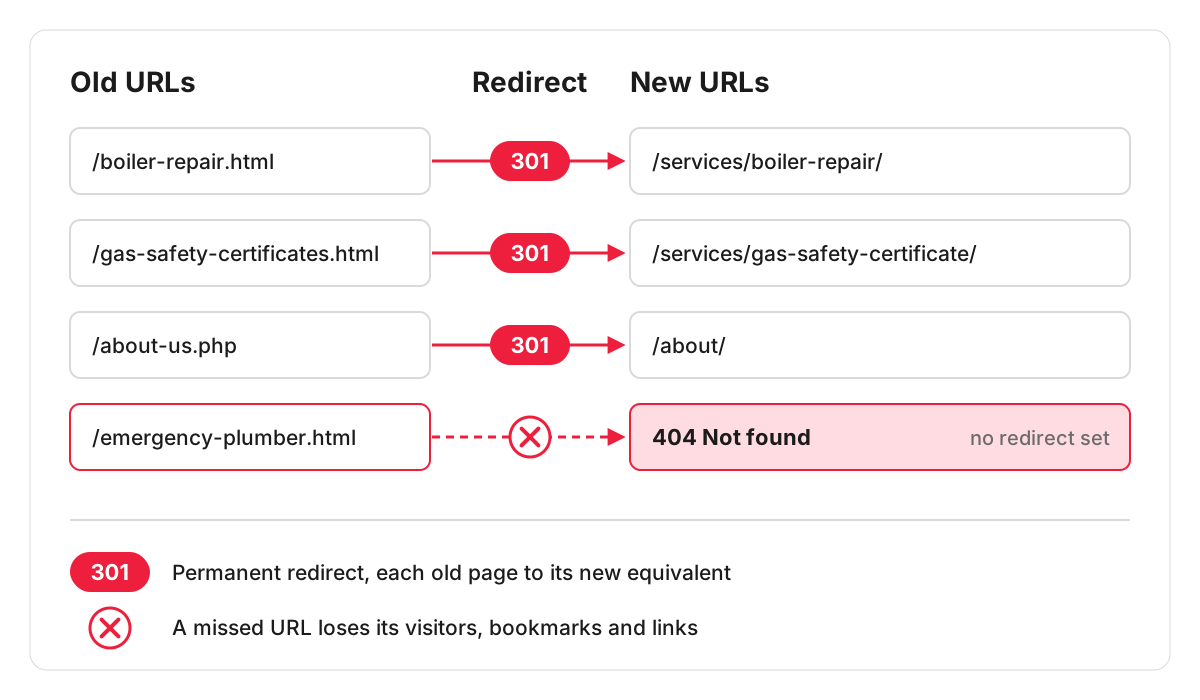
- Old addresses return a 404 error. Every link from another website, every bookmark and every search result pointing at the old page now leads nowhere, and the value those links carried is lost.
- Everything redirects to the home page. It looks tidy, but a visitor looking for boiler repair lands on a generic page, and Google’s site move guidance says not to redirect many old URLs to one irrelevant destination.
- The staging site’s settings go live. A noindex tag or a robots.txt rule used to hide the test version is copied to the live site and keeps the new pages out of the index.
- Canonical tags still point at the old addresses. The new pages tell Google that the old ones are the main version. The page on canonicalization explains how this signal works.
- Content is lost along the way. Pages that ranked are dropped from the new structure, long service texts are cut to fit the new design, or titles and meta descriptions are not carried over.
- Tracking breaks. The GA4 tag or the form tracking is missing on the new site, so the reports show a fall that is partly a measurement gap.
What a safe migration includes
A full list of old URLs. Built from a crawl of the current site, the XML sitemap, the pages that get traffic in Search Console and analytics, and the pages other websites link to. A page missed from this list will not get a redirect.
A redirect map. A spreadsheet with every old address in one column and its new address in the next, matched page to page:
- /boiler-repair.html – /services/boiler-repair/
- /gas-safety-certificates.html – /services/gas-safety-certificate/
- /about-us.php – /about/
Each old URL goes straight to its final address with a permanent (301) redirect. Chains, where A redirects to B and B to C, slow pages down and are easy to create when an earlier set of redirects is still in place. Google’s site move guidance is to redirect to the final destination directly and to keep redirects for as long as possible, generally at least a year. In practice there is little reason ever to remove them.
A test before launch. The redirect map is tested on the staging site, the new pages are checked for titles, meta descriptions, headings and structured data, and internal links are updated to point at new addresses directly, so the site does not rely on its own redirects.
Launch-day steps. Remove any staging restrictions and submit the new XML sitemap in Search Console. For a move to a new domain or subdomain, also use the Change of Address tool in Search Console; Google says it is not needed for a move from HTTP to HTTPS or for path changes within the same site. Keep the old domain registered so the redirects keep working.
What to check in the first weeks after the move
- Run the old URL list through a crawler. Every address should return one 301 to a live page, with no 404s and no chains.
- Watch the Page indexing report in Search Console: new URLs should appear as indexed while old ones move to “Page with redirect”. The statuses tell you whether Google has picked up each redirect.
- Compare the sitemap figures for submitted and indexed pages.
- Check the Performance report for queries and pages that have dropped, and look at those pages first.
- Confirm that GA4 records visits and that enquiry forms and calls are still tracked as conversions.
- Open the pages with the most links from other websites and make sure each one lands on its new equivalent.
Planning a move with us
Before a move we can review the plan, from the list of old URLs to the redirect map, so gaps are found while they are still easy to fix. If you are planning a domain, platform or URL change, we offer SEO support before and after the move. When the move is part of a rebuild, our article on how to build a website with SEO in mind covers the decisions worth making before design starts.
FAQ
Is changing the design of my website a migration?
Only if the addresses or the content change. A new design on the same platform, with the same URLs and the same text, carries far less risk. Once pages are renamed, merged or removed, it needs the same redirect planning as any other migration.
Will my rankings change after a migration?
Some movement is normal while Google processes the new addresses: its site move guidance tells site owners to expect temporary fluctuation in rankings during the move. A lasting drop usually traces back to one of the mistakes listed above, which is what the checks after launch are there to catch.
How long does it take Google to process a site move?
For a medium-sized website, Google says it can take a few weeks or more before the new URLs gradually replace the old ones in its results. For small and medium sites it recommends moving all URLs at the same time; a large site can be moved one section at a time.
How much does it cost to migrate a website?
It depends on what changes. A hosting move with the same addresses is mostly server work. A platform or domain change needs the full URL list, a redirect for every page, content transfer and the checks after launch, so the cost grows with the number of pages and how much the structure changes. When the migration is part of a rebuild, ask for the content transfer and the redirect work as separate lines in the estimate, so you can see what the move itself costs.
