
Search engine indexing is the stage where a search engine analyses a page it has crawled and stores it in its index, the database it draws results from. A page that is not indexed cannot appear in search for any query, however good its content is. Indexing is not automatic: Google states that not every page it processes will be indexed and decides page by page what to keep.
The word also has a separate meaning in databases, where an index speeds up lookups in a table. This page is about search.
Crawling, indexing and ranking: three separate steps
Say a dental clinic in Oxford adds a new page about dental implants.
- Crawling. Googlebot finds the page through a link from another page or through the XML sitemap, and downloads it.
- Indexing. Google reads the content, works out what the page is about, checks whether it duplicates another URL and, if it decides the page is worth keeping, stores it.
- Ranking. When someone searches “dental implants Oxford”, Google picks pages from its index and puts them in order.
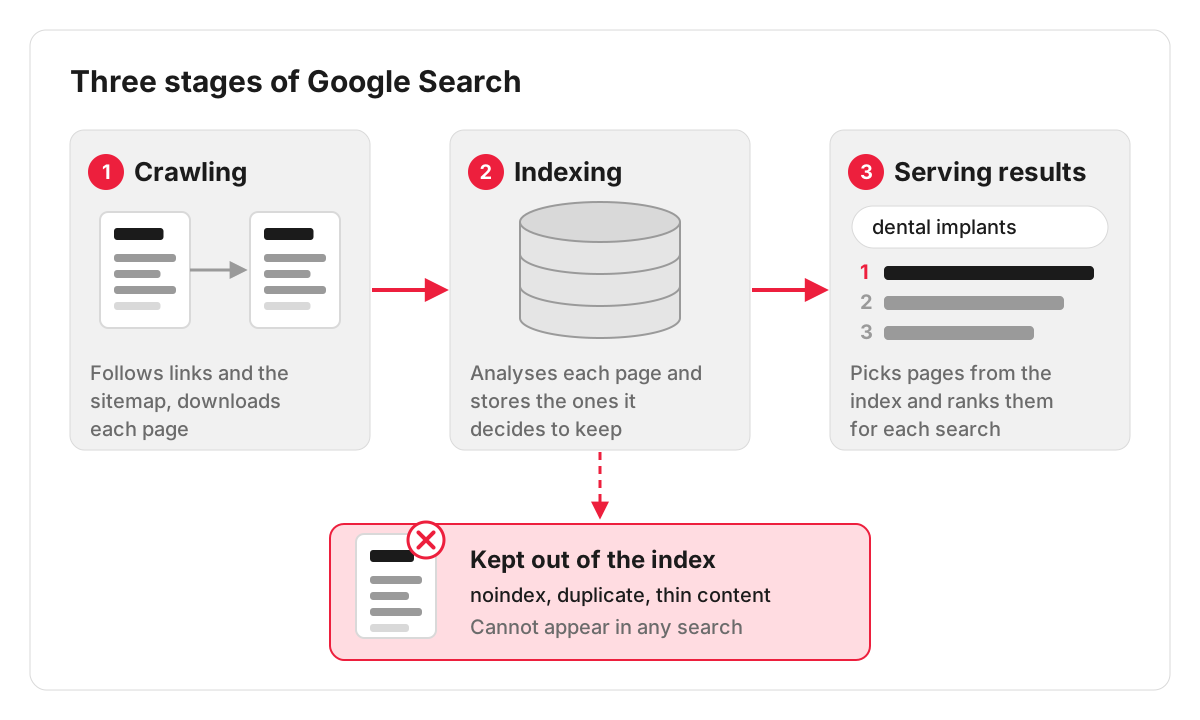
A problem at any step stops the next one. A page that is crawled but not indexed never gets the chance to rank, which is why indexing is the first thing to rule out when a page brings no search traffic. How well indexed pages then perform is a question of website visibility.
How to tell whether a page is indexed
- The site: search. Type site:example.co.uk/dental-implants into Google. If the page appears, it is indexed. If it does not, that is a hint to look further: Google says the site: operator does not necessarily return all indexed URLs.
- URL Inspection in Google Search Console. Paste the address and Google reports whether the URL is on Google, when it was last crawled and which version it treats as the main one. This is the reliable check for a single page.
- The Page indexing report in Search Console. It splits every known URL into indexed and not indexed, and groups the second list by reason.
Why Google leaves pages out of its index
The Page indexing report names the reason for each group of URLs. The ones that come up most on business websites, with the labels Google’s help page uses:
- URL marked ‘noindex’. The page tells search engines not to index it, through a robots meta tag or an HTTP header. On WordPress a common culprit is the “Discourage search engines from indexing this site” box, ticked while the site was being built and never unticked at launch. An SEO plugin setting on a single page can do the same.
- URL blocked by robots.txt. The robots.txt file stops Google crawling the page. Google’s introduction to robots.txt says it is not a mechanism for keeping a web page out of Google: a blocked URL can still appear in results, without a description. To keep a page out of search, it has to stay crawlable and carry a noindex rule.
- Duplicate, Google chose different canonical than user. Google considers the page a copy of another URL and indexes that one. The page on canonicalization explains how this happens and how to fix it.
- Crawled – currently not indexed. Google has fetched the page and decided not to store it for now; it may still be indexed later. Thin or near-identical content is worth checking first: a roofing company with twenty town pages that differ only in the town name is a typical case.
- Discovered – currently not indexed. Google knows the URL exists and has not crawled it yet. Google’s explanation is that it rescheduled the crawl to avoid overloading the site. On a small site, also check how many internal links point to the page.
- Not found (404), Soft 404 and Server error (5xx). The page is missing, looks empty to Google, or the server failed when Google called.
Not every excluded URL is a fault. Thank-you pages, basket and checkout pages, filtered product lists and redirected old addresses are meant to stay out. The useful question is whether a page you want people to find is on the wrong list.
How long does indexing take?
Google’s help page on asking Google to recrawl your URLs says that crawling can take anywhere from a few days to a few weeks. A new page on an established site with good internal links is usually found faster than a page on a new domain that nothing links to yet.
Ways to get a page indexed faster
- Link to it from pages that are already indexed. A new service page linked from the home page and from related service pages is found sooner than one reachable only through the sitemap.
- Keep the XML sitemap current and submit it in Search Console, so new and updated URLs are listed in one place.
- Request indexing in URL Inspection. Useful for a handful of important pages after launch or a big update. Google sets a quota for these requests and states that a request does not guarantee the page will appear in its index.
- Make the page worth storing. Original content that answers a real question is what moves a page out of “Crawled – currently not indexed”.
Bing has its own index and its own tools. Pages can be checked in Bing Webmaster Tools, and Bing supports IndexNow, a protocol that lets a site notify search engines as soon as a page is added, updated or deleted.
Fixing pages that stay out of the index
When Search Console shows pages you need sitting in the excluded list, the cause is often a single template or setting repeated across the site: a noindex left on a page type, a canonical pointing the wrong way, a robots.txt rule that is too broad. We trace the reason for each group of URLs and set out the technical SEO fixes needed. Making those changes is work for our development team, agreed with you separately.
FAQ
My page is indexed but gets no traffic. Is that an indexing problem?
No. Once URL Inspection reports that the URL is on Google, indexing has done its job. Low traffic from an indexed page is a ranking question: how well the page matches what people search for and how it compares with competing pages.
Do I need to submit every new page to Google?
No. A site with a working XML sitemap and sensible internal links is crawled regularly. Manual requests are worth it for important pages you want picked up quickly, such as a new service page or a page you have just fixed.
How do I remove a page from Google’s index?
For a quick, temporary removal, use the Removals tool in Search Console: a successful request lasts about six months. To keep the page out for good, delete it so the server returns a 404 or 410, put it behind a password, or add a noindex tag. Google’s help page warns against using robots.txt for this.
What is mobile-first indexing?
Google indexes and ranks the mobile version of a page, crawled with its smartphone agent. If the mobile layout drops text, titles or structured data that the desktop version has, Google works from the reduced version, so its mobile-first indexing guidance asks for the same content, structured data and metadata on both. A site built with responsive design serves the same content to phones and computers, which avoids the gap.
