
497
Google Penalties: Manual Actions, Algorithm Updates and How to Recover
When search traffic falls sharply, many site owners suspect a Google penalty. Older SEO articles call these “filters” or “sanctions”, but Google uses different terms. A manual action is applied when a person on Google’s team finds that a site breaks its spam policies. Algorithmic changes happen when Google’s automated systems, including regular core updates and spam updates, rank a site lower. This guide explains the difference, how to run a Google penalty check and what to do to recover. If you would rather hand the problem to specialists, see our SEO services.
What Is a Google Penalty?
Google’s official term for a penalty is a manual action. It is issued when a human reviewer finds pages that do not comply with Google’s spam policies, such as cloaking, hidden text, keyword stuffing or unnatural links. Most manual actions lower a site’s rankings or remove pages from the results, and they are reported to the site owner in Google Search Console. Much more often, though, a drop has no manual action behind it: Google’s automated systems have reassessed the site, or other pages now answer the same searches better. In that case nothing appears in Search Console, and the decline can be gradual, which makes it harder to spot.
Find the cause before you spend more on content, links or Google Ads to make up for the lost traffic. A manual action can affect the whole site or only some pages, and each type of drop needs a different fix.
Types of Google Penalties and Ranking Changes
- Manual actions. The Manual Actions report in Search Console lists the issue Google found. Common types include unnatural links to your site, unnatural links from your site, thin content with little or no added value, cloaking or sneaky redirects, hidden text or keyword stuffing, user-generated spam, structured data issues and breaches of the site reputation policy. Some actions affect all pages, others only certain sections.
- Spam detected by automated systems. Google uses spam detection systems, including its AI-based SpamBrain, and occasionally releases spam updates that improve them. Its spam policies say that sites which break them “may rank lower in results or not appear in results at all”. The policies cover link spam, keyword stuffing (for example, “cheap laptops London, buy laptop London cheap”), scaled content abuse, scraped content, expired domain abuse and more. These algorithmic demotions do not appear in the Manual Actions report.
- Core algorithm updates. Several times a year Google makes broad changes to its ranking systems. Google says core updates do not target specific sites or pages, so a drop after a Google algorithm update is not a penalty: it means Google now judges other pages as more helpful for those searches. The dates of each update are published on the Google Search Status Dashboard.
- Google Panda (history). Panda was announced in 2011 to make sure high-quality, original content appeared in search results, and it targeted thin, copied and low-value pages. According to Google’s guide to its ranking systems, it became part of the core ranking systems in 2015. The helpful content system, announced in 2022 with a similar aim, also became part of the core systems in March 2024.
- Google Penguin (history). Penguin was announced in 2012 to fight link spam, such as bought links and link schemes. It was integrated into the core ranking systems in 2016. Today link spam is handled by the core systems and spam detection systems, and serious cases can still lead to a manual action for unnatural links.
Older articles also mention a “sandbox” for new websites, a “-30 filter” and Hummingbird. Google does not describe a sandbox or a -30 filter in its documentation, and Hummingbird was a 2013 improvement to its ranking systems, not a penalty. A new website simply has little content, few links and no history, so it usually takes time to rank; buying an expired domain to skip this step can break the expired domain abuse policy. Traffic can also fall for reasons that have nothing to do with penalties: technical errors that stop Google crawling or indexing pages, a hacked site with security warnings, a site migration without proper redirects, or lower demand because of the season.
How to Check for a Google Penalty
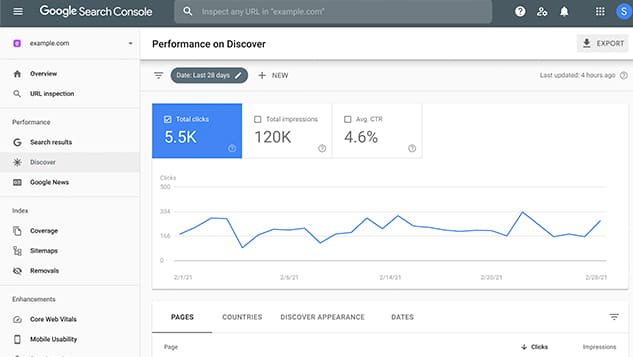
Start with the Manual Actions report in Google Search Console. If Google has applied a manual action, the report names the issue and shows whether it affects the whole site or only some pages, and you also receive a message in Search Console. A quick extra check is to search Google for your brand name: if your home page does not appear at all, there is a serious problem with a manual action or with indexing.
If the report shows no issues, look for other causes. Open the Performance report in Search Console and find the date the drop began. Compare it with the list of ranking updates on the Google Search Status Dashboard: if the dates match a core or spam update, the change is probably algorithmic. Check Google Trends to see whether interest in your topic has fallen across the market, and use the Page indexing, Crawl stats and Security issues reports in Search Console to rule out technical problems and hacking.
How to Recover from a Google Penalty
Once you know the cause, you can fix it and give Google a reason to rank the site again. General steps:
- for a manual action, fix the issue on every affected page, because a partial fix does not bring a partial recovery. Make sure Google can reach the pages, then select Request Review in the Manual Actions report and explain the problem, what you did and the result. Google says a review can take days or weeks, and it emails you when the review is complete;
- for content problems or a drop after a core update, review the site against Google’s questions for helpful, reliable, people-first content, improve or merge thin pages, remove keyword stuffing and update outdated information. Google warns that it can take several months for its systems to recognise the improvements, sometimes until the next core update;
- for link problems, review your backlink profile in the Search Console Links report and a backlink tool, stop buying links and large-scale link exchanges, and ask site owners to remove unnatural links or mark them with rel=”sponsored” or rel=”nofollow”. Use the disavow tool only for links you cannot remove. Our guide to off-page SEO explains how to build links safely.
The safest protection is to follow Google’s spam policies from the start. If your traffic has dropped and you are not sure why, an SEO audit or an SEO consultation will help find the cause.

Comments