
Microdata markup is a way of labelling content inside a page’s HTML so search engines know exactly what it is: a business name, an address, a product price, an event date. It adds attributes such as itemscope, itemtype and itemprop to existing elements, as defined in the HTML Living Standard, usually with the Schema.org vocabulary, and is one of three structured data formats Google can read.
It works alongside meta tags, which describe the page as a whole. Microdata describes the things on the page.
Microdata, JSON-LD or RDFa: which format does Google recommend?
Google’s Search Central documentation lists all three as supported and says: “Google recommends using JSON-LD for structured data if your site’s setup allows it.” The same page adds that all three formats are equally fine for Google as long as the markup is valid. The difference is where the information lives.
- Microdata sits inside the visible HTML. Each label is attached to the element it describes, so the markup depends on the template. Change the design, and the labels can quietly disappear with it.
- JSON-LD is a separate block of code, usually in the head of the page, that lists the same facts in one place. A CMS or plugin can generate it, and it can be updated without touching the layout.
- RDFa follows the same idea as microdata, with attributes added to HTML elements. It is a W3C Recommendation and is rarely the format you will find on a small business site.
Should a WordPress site keep the microdata it already has?
Plenty of older WordPress themes have microdata written into their templates, while SEO plugins such as Yoast SEO and Rank Math output JSON-LD. The result is often two separate descriptions of the same business on every page.
If the theme’s markup passes the tests below, matches what visitors see and is not repeated by a plugin, there is no urgent reason to rip it out. It becomes a problem when the two sources disagree, for example an old phone number in the theme markup and the new one in the plugin. The natural moment to move fully to JSON-LD is a redesign or a change of theme, when the templates are being rewritten anyway.
What structured data can add to a search listing
Search engines use structured data to show rich results: listings with extra detail beyond the standard snippet. An online shop selling garden tools that marks up its product pages can have the price, stock status and review rating appear under the page title. Event pages can show dates, recipe pages can show cooking time, and on desktop, breadcrumb markup can replace the raw URL with a readable path.
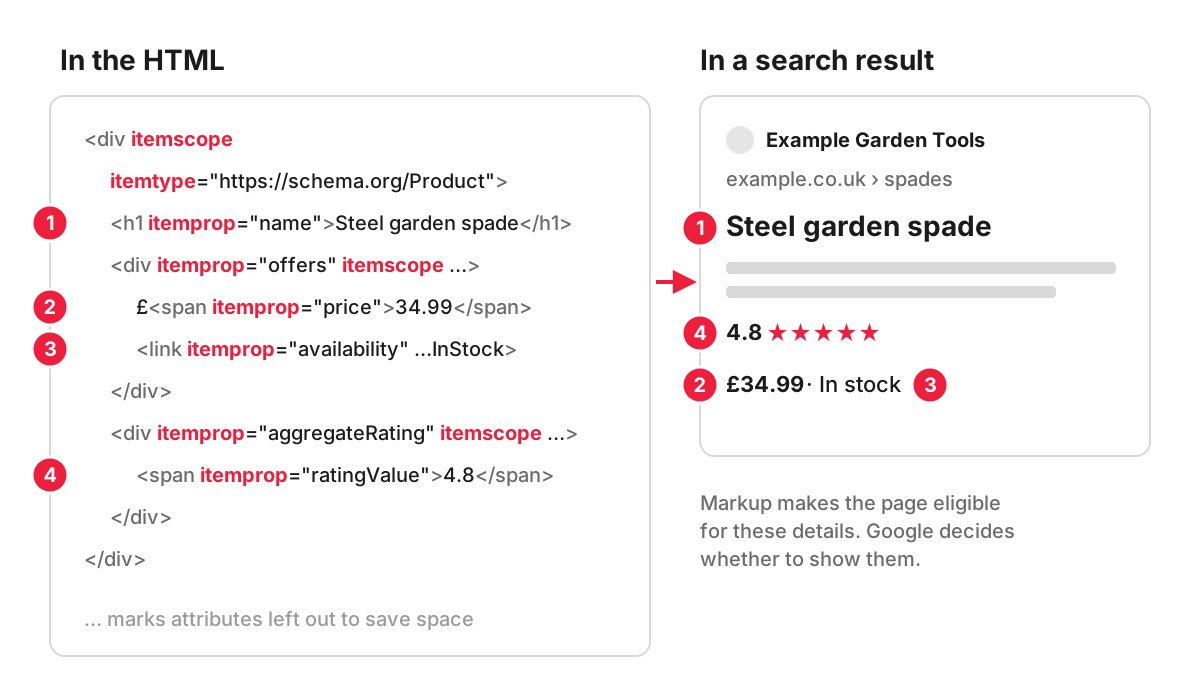
Markup makes a page eligible for these features and does not guarantee them: Google’s structured data guidelines state that it does not guarantee your structured data will show up in search results. Some features have also been withdrawn. Google’s log of documentation updates records that HowTo rich results stopped appearing on desktop and mobile in September 2023, that FAQ rich results were limited at the same time to well-known, authoritative government and health websites, and that FAQ rich results stopped appearing in Google Search from 7 May 2026. Google’s review snippet guidelines also make a business that controls the reviews about itself ineligible for review stars, so a hotel that marks up testimonials on its own website will not earn stars that way.
What microdata looks like in code
Here is a simple description of a bakery in Woodstock, written as microdata around the visible content:
<div itemscope itemtype="https://schema.org/Bakery">
  <h2 itemprop="name">Example Bakery</h2>
  <p itemprop="address" itemscope itemtype="https://schema.org/PostalAddress">
    <span itemprop="streetAddress">1 High Street</span>,
    <span itemprop="addressLocality">Woodstock</span>
  </p>
  <a itemprop="url" href="https://www.example.co.uk/">example.co.uk</a>
</div>
The same facts in JSON-LD, placed inside a script element with the type application/ld+json:
{
  "@context": "https://schema.org",
  "@type": "Bakery",
  "name": "Example Bakery",
  "address": {
    "@type": "PostalAddress",
    "streetAddress": "1 High Street",
    "addressLocality": "Woodstock"
  },
  "url": "https://www.example.co.uk/"
}
Both say the same thing to a search engine. The JSON-LD version can be moved, edited or generated by the CMS without anyone touching the HTML that visitors see.
Will microdata improve my rankings?
Not by itself. Google’s documentation presents structured data as a way to help it understand a page and to make the page eligible for rich results, and it does not describe markup as a way to rank higher. Where it pays off is presentation: a listing with a price and availability gives a shopper more reason to click than a plain blue link.
One condition applies to every format: the markup has to describe content that is actually on the page. The structured data guidelines say not to mark up content that is not visible to readers, and breaking them can lead to a manual action, reported in Search Console. According to Google, that kind of manual action removes the page’s eligibility for rich results and does not affect how the page ranks in web search.
Testing your markup
- Rich Results Test (from Google) shows which rich result types it found on a page and flags errors in the markup. It reads JSON-LD, RDFa and microdata, and checks the rich result types Google supports in search.
- Schema Markup Validator checks any Schema.org markup, including types Google does not use for rich results.
- Rich result reports in Search Console show valid and invalid items across the site once the markup is live, so an error introduced by a template change shows up on every affected page type. The reports show a sample of detected items, not a complete list.
Test the live URL as well as the code snippet. If the markup is added by JavaScript or a plugin, the live test is the one that shows what Google actually receives.
How we look at inherited markup
On an established site the first question is what the existing markup actually says, and whether a theme and a plugin are both describing the same business. That is the kind of issue we review in technical SEO work. Each issue comes with a recommendation on how to fix it, and our developers can make the changes as a follow-on job.
FAQ
Is microdata the same as schema markup?
Not quite. Schema.org is the vocabulary: the agreed names for things like LocalBusiness, Product and Event, which can be written as RDFa, microdata or JSON-LD. Microdata is one way of writing that vocabulary into a page. “Schema markup” is the everyday name for any of them.
Does every page need structured data?
No. Add it where a supported type fits the content: organisation or local business details on the home and contact pages, Product on product pages, Article on blog posts, Event on event pages. A general information page with no matching type gains nothing from forced markup.
Do I need structured data to appear in Google’s AI Overviews?
No. Google’s guidance on AI features says there is no special Schema.org structured data to add for AI Overviews or AI Mode. The same page lists structured data that matches the visible text among the SEO practices that remain worthwhile, so accurate markup still has a job to do.
How do I add microdata to a WordPress site?
Microdata goes into the theme’s template files, because the attributes sit on the HTML elements that display the content. Make the edits in a child theme, so the parent theme can be updated without losing them. On most WordPress sites it is simpler to let an SEO plugin output JSON-LD, and our WordPress SEO guide for beginners covers setting one up.
