
In SEO, a snippet is the short piece of text that Google shows under a page’s title in search results, previewing what the page says about the search. People also use the word for the whole search result: the site name, web address, title, description and any extras such as star ratings or prices. The snippet is what a searcher reads when deciding which result to click.
Outside search, “snippet” also means a small piece of reusable code or a cropped screenshot. This page is about search results.
The parts of a search result
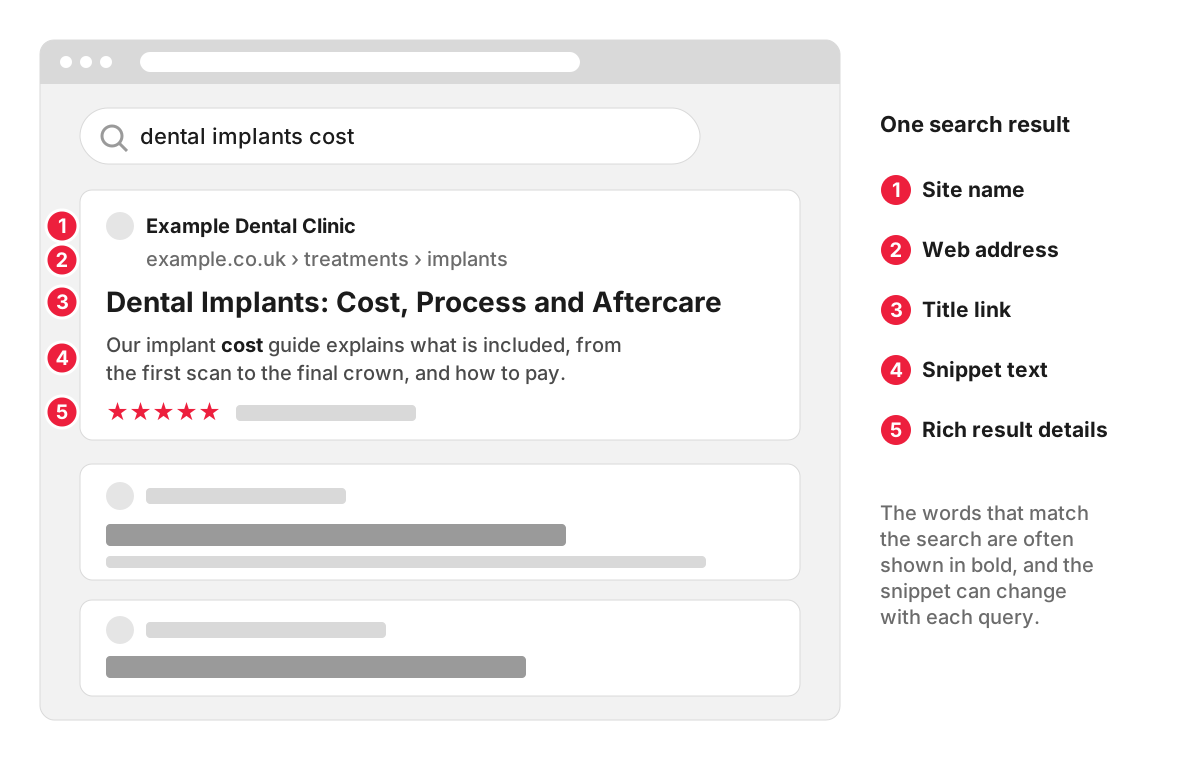
- Site name and favicon, so searchers can recognise the business.
- Web address, often shown as a breadcrumb trail, such as example.co.uk › treatments › implants.
- Title link, the clickable headline. Google builds it mainly from the page’s title element, and can also use the main heading, Open Graph title or the text of links pointing to the page, as its guide to title links explains.
- Snippet text, one or two lines describing the page, with words that match the search often shown in bold.
- Rich result details, such as review stars, prices, availability or event dates, which come from structured data on the page.
Where the snippet text comes from
Google says it primarily uses the content on the page to choose the snippet automatically, and sometimes uses the meta description when that gives a more accurate summary. Snippets are designed to preview the part of the page that best matches each search, so the same page can show different snippets for different queries.
Take the implants page of a dental practice. For the search “dental implants cost”, Google may show the paragraph about prices and payment plans. For “are dental implants painful”, the same page may appear with a sentence from the section about anaesthetic and recovery. The meta description might appear for neither. A well-written meta description still matters: it gives Google a good summary to use when the page text does not offer a better one.
Featured snippets
A featured snippet is a special box near the top of the results where the usual format is reversed: the answer comes first, taken from a page, with the page’s title and link underneath. Google’s documentation on featured snippets says its systems decide automatically whether a page would make a good featured snippet for a search, and that you cannot mark a page as one yourself.
Pages that answer a question directly, in a short paragraph or list right under a heading that matches the question, give Google the kind of text it can lift for this box. That is also simply clear writing for readers.
Rich results
Rich results add visual details to a standard snippet: star ratings on a product, the price and stock status, the date and venue of an event, or a recipe’s cooking time. They come from structured data, code that labels these details for search engines. Google’s introduction to structured data explains that correct markup makes a page eligible for rich results, which Google can then show. Our entry on microdata markup covers the formats and how to test them.
How to control your snippets
You cannot write the snippet directly, but you can limit it:
<!-- No text snippet for this page -->
<meta name="robots" content="nosnippet">

<!-- Snippets of up to 120 characters -->
<meta name="robots" content="max-snippet:120">

<!-- Keep one part of the page out of snippets -->
<p data-nosnippet>Opening offer valid for bookings made this month.</p>
Use these with care. Google states that to appear as a supporting link in AI Overviews or AI Mode, a page must be indexed and eligible to be shown with a snippet, so a nosnippet tag also takes the page out of those answers.
Getting more clicks from your snippets
- Answer the search near the top. A clear first paragraph under a heading that matches the query gives Google good text to show.
- Write a description for every important page. Summarise what the page offers and why it is worth clicking, in plain words.
- Keep titles specific. “Dental Implants: Cost, Process and Aftercare” tells the searcher more than “Treatments”.
- Add structured data where it fits. Reviews, prices and opening hours can make your result stand out next to plain ones.
- Check the numbers. In Search Console’s Performance report, click-through rate is clicks divided by impressions. Pages with many impressions and a low click-through rate are the first candidates for a better title and description; website visibility explains how to read the report.
How we work with snippets
Our SEO services use your Google Search Console data alongside Ahrefs and Semrush, so we can see which pages already appear in search and how often they are clicked before anything is changed. Titles, descriptions and opening paragraphs belong to on-page SEO, and our Starter package is built around supporting and improving the pages you already have.
FAQ
How long should a snippet be?
Google decides the length, and it shortens snippets to fit the screen. There is no length limit for the meta description itself. If you want to cap how much text Google may show, the max-snippet setting above sets a maximum in characters.
Can I preview my snippet before publishing?
Only roughly. SEO plugins such as Yoast SEO show a preview of the title and meta description on desktop and mobile, which helps you check the length and wording. Google still chooses the text for each search, so the live result may show a different sentence from the page.
What is a rich snippet?
“Rich snippet” is the older name for what Google now calls rich results: search results with extra details such as ratings, prices or event dates, generated from structured data. The terms are still used interchangeably in many SEO tools and articles.
Why has my snippet changed when I did not edit anything?
Because Google chooses the snippet for each search from the page content, a different query can bring up a different sentence, and Google may also change its choice after recrawling the page. If the snippet for an important search is unhelpful, improve the paragraph that answers that search on the page itself.
