
On-page SEO is the work done on a web page itself to help it rank for the searches it is meant to answer: its content, title, description, headings, web address, images and the links inside it. Every part of it is under your control, which makes it the most direct way a business can influence how its pages perform in search. It is also called on-site SEO, and some translated SEO texts call it “internal optimisation”.
It is one of the main parts of SEO. Technical SEO makes sure search engines can reach and process the site as a whole, and off-page SEO deals with signals from other websites. The FAQ below compares them.
What on-page SEO covers
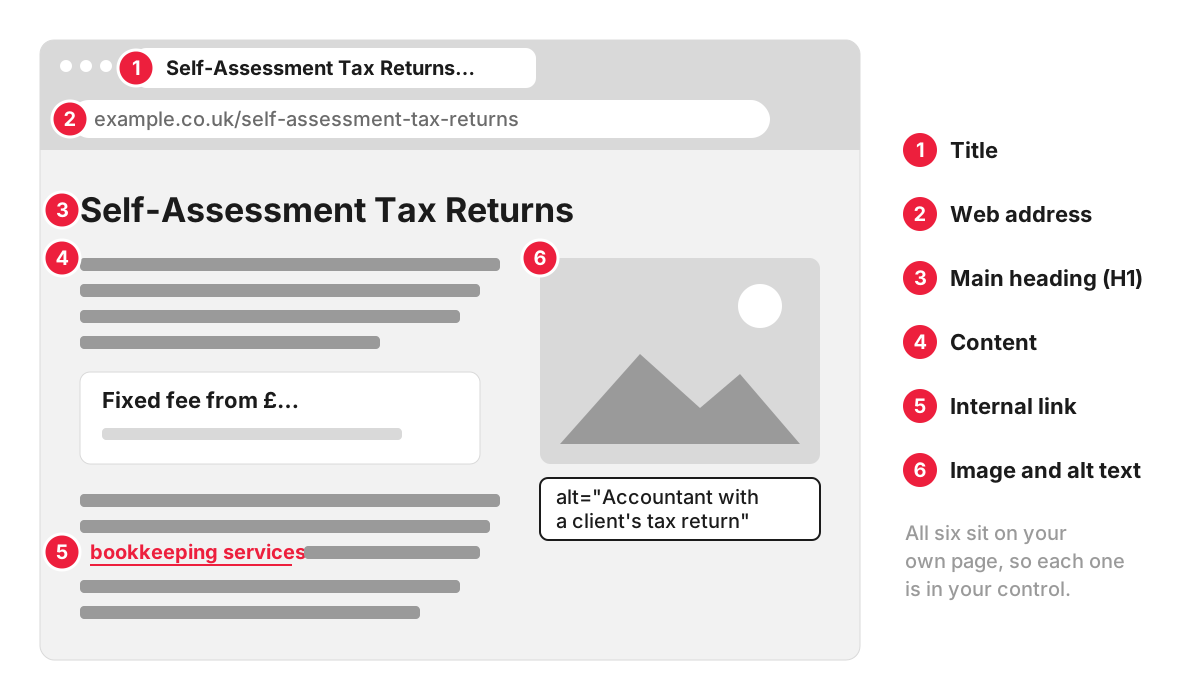
- Search intent and content. The page gives the searcher what they came for. Someone searching “self-assessment accountant” wants to know the fee, what to send and how to get started. Google’s guidance on helpful, people-first content asks whether a page provides original information or analysis, and warns against content made mainly to attract visits from search engines.
- Title. The title element is the main source of the clickable headline in search results. Google’s guidance on title links asks for titles that are descriptive, concise and distinct for every page.
- Meta description. A short summary that Google sometimes shows under the title. It is written for the person deciding whether to click. Our entry on meta tags shows how it fits in the page code.
- Headings. One main heading (H1) that says what the page is about, and subheadings wherever the topic changes, so that people and search engines can scan the page.
- Web address. Short and readable. Google recommends readable words with hyphens between them, so /services/self-assessment-tax-returns says far more than /page?id=4471.
- Internal links. Links from related pages, with words that describe the destination, show Google how your pages relate and help visitors take the next step. See internal linking.
- Images. Compressed files, sensible file names and alt text that says what each image shows.
- Structured data. Code that labels prices, opening hours, reviews or FAQs so they can appear in the search result; see microdata markup.
An example: one page becomes four
An accountancy practice has a single page called “Services”. It lists bookkeeping, payroll, VAT returns and self-assessment in a paragraph each, and its title is “Services | Practice Name”. The page appears in search, but only far down the results for each of those services, because it answers none of them in depth.
On-page work splits it into a page for each service. The self-assessment page gets the title “Self-Assessment Tax Returns for Sole Traders | Practice Name”, an H1 that matches it, an address ending in /self-assessment-tax-returns, the fixed fee, the list of records a client needs to send, the filing deadlines and a short FAQ. It links to the bookkeeping page where the two services overlap, and the old “Services” page becomes a short overview that links to all four.
Nothing about the business has changed. Each search now has one page that answers it properly.
Common on-page mistakes
- Several pages chasing the same search. Two blog posts and a service page all aimed at “loft conversion cost” compete with each other, and Google may show the weakest of the three. Give the topic one main page and link the others to it.
- The same title on many pages. Templates that output the company name alone, or “Home | Company” everywhere, leave Google and searchers unable to tell pages apart.
- Keyword stuffing. Google’s spam policies describe it as filling a page with keywords in an attempt to manipulate rankings, including blocks of text that list every town a page wants to rank for.
- Thin pages. A page with two sentences and a contact form gives Google little reason to rank it above a competitor who explains prices, process and timescales.
How we work with on-page SEO
An SEO audit of a small website costs £370. You receive a report, a prioritised task list and a presentation call where we walk you through the findings and answer your questions. The fixes are a separate piece of work, which your team or our developers can carry out.
FAQ
What is the difference between on-page and off-page SEO?
On-page SEO is everything you change on your own pages, such as content, titles, headings and internal links. Off-page SEO is what happens elsewhere on the web: other sites linking to you, mentioning you or reviewing you. Technical SEO is often treated as a third area, covering the site as a whole: crawling, speed, mobile display, redirects and duplicate addresses. A page needs to be relevant to a search before outside signals can do much for it, so on-page work usually comes first.
Which tool is best for on-page SEO?
Start with Google Search Console, which is free and shows the searches each page appears for and how often it is clicked. A site crawler such as Screaming Frog lists the titles, descriptions, headings and links of every page, so repeated or missing ones are easy to spot. On WordPress, a plugin such as Yoast SEO lets you edit titles and descriptions page by page.
How much does on-page SEO cost?
It depends on the number of pages and whether you need a one-off review or ongoing work. A one-off audit is priced above. For ongoing work, our monthly SEO packages start at £500 a month, and the Starter package supports and improves the pages you already have. New pages and content come with the larger packages.
How long does on-page SEO take to work?
A change counts only once Google has crawled the page again, which Google says can take from a few days to a few weeks. You can request a recrawl with the URL Inspection tool in Search Console, but a request does not guarantee when, or whether, the page is updated in results. A new title can appear in the results soon after that visit, while new content aimed at different searches takes longer to settle into its positions.
