
Canonicalization in SEO is the process of choosing one main address, the canonical URL, for content that can be reached at several URLs. Search engines then index and show that version, and combine the signals from the duplicates, such as links, into it. Website owners usually state their preference with a canonical tag.
Without that signal, Google picks a version itself, weighing factors such as HTTPS, redirects and the sitemap, as its guide to canonicalization explains. It may well choose the right one, but it may also show a tracking link or a filtered page in search results, or spread attention across copies of the same page.
How one page ends up with several addresses
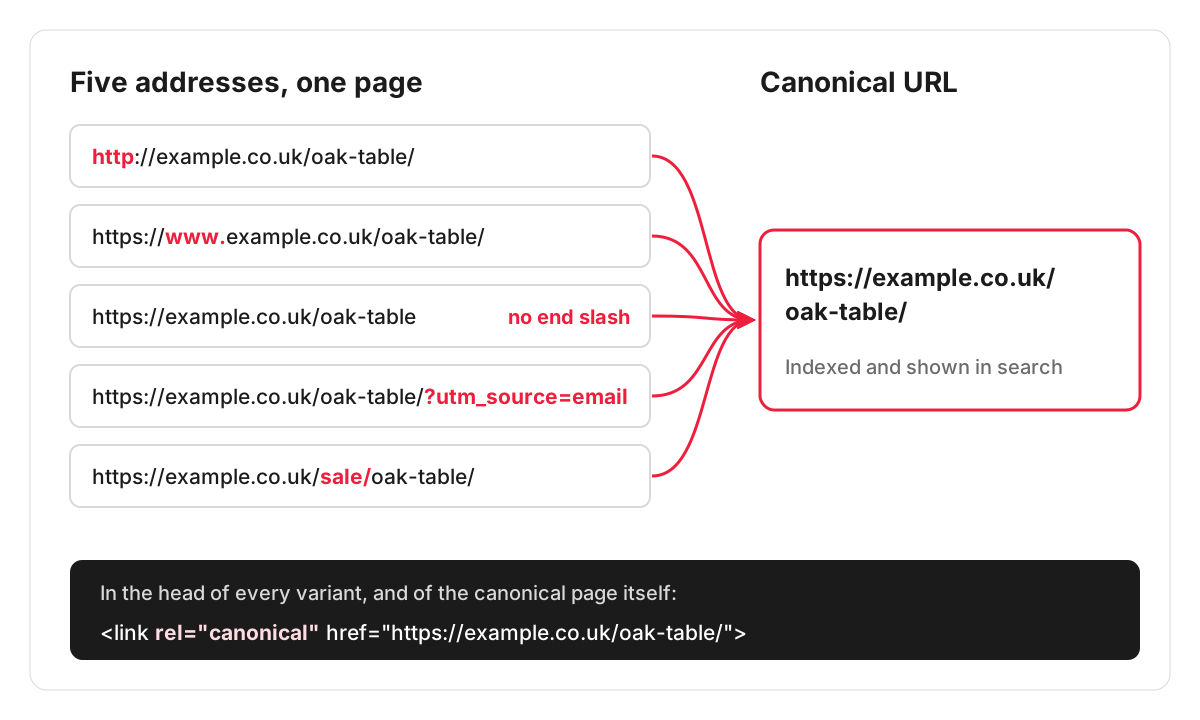
Most duplicate URLs are created by the website itself. Take an online furniture shop with a product page for an oak dining table. All of these can show the same page:
- http://example.co.uk/dining-tables/oak-table and https://example.co.uk/dining-tables/oak-table
- https://www.example.co.uk/dining-tables/oak-table and the same address without www
- the same address with and without a slash at the end
- https://example.co.uk/dining-tables/oak-table?utm_source=newsletter, when the table is promoted in an email campaign
- https://example.co.uk/dining-tables?colour=oak&sort=price, when a filter or sort order changes the URL
- https://example.co.uk/sale/oak-table, when the product also sits in a sale category
To a visitor these are one page. To a search engine each one is a separate URL that has to be crawled and compared. Some should never exist side by side (http and https, www and non-www), and some have a genuine reason to (campaign tracking, filters, a product in two categories).
What a canonical tag looks like
A canonical tag is one line in the head section of a page: a link element with rel=”canonical” and the full address of the preferred version, for example https://www.example.co.uk/dining-tables/oak-table/. Every variant of the page carries the same line, pointing at that one address. The preferred page normally points at itself, which is called a self-referencing canonical.
For files without a head section, such as PDFs, Google’s documentation on duplicate URLs says the same instruction can be sent as a rel=”canonical” HTTP header.
On most platforms you do not write this by hand. WordPress outputs a canonical tag on single posts, pages and other single views. Yoast SEO adds canonical URLs across the site and lets you set a different one for a post, page, category or tag in the Advanced tab of its sidebar. Shopify makes a canonical URL for the current page available to every theme, and the theme outputs the tag, so a custom or heavily edited theme is worth checking.
Canonical tag or 301 redirect?
They solve different problems.
A 301 redirect sends visitors and search engines from the old address to the new one, so the old address stops showing content at all. Use it when a version should not exist: http to https, www to non-www, an old URL after a page is renamed or a site is moved. Redirects are the backbone of any website migration.
A canonical tag leaves every version open to visitors and only tells search engines which one to index. Use it when the duplicates have a job to do: the newsletter link needs its tracking parameters, the filter needs to work, the sale category needs to list the table.
The same Google documentation describes redirects and rel=”canonical” as strong signals and a sitemap as a weak one. Using them together, so they all point at the same address, gives the clearest message.
When Google ignores your canonical
Google treats a canonical tag as a signal and can choose a different page when the rest of the evidence disagrees with it. Common reasons on small business sites:
- The canonical points at a page that redirects, returns an error or carries a noindex tag.
- Internal links and the XML sitemap use one version of the URL while the canonical names another.
- The pages are not really duplicates: the “duplicate” has different text, and Google treats it as a page in its own right.
- The theme and an SEO plugin each output a canonical tag, and the two disagree.
- The canonical points at an http address while the site runs on https. Google states that it generally prefers HTTPS pages over equivalent HTTP pages as canonical.
On multilingual sites there is a specific trap. Google asks you to specify a canonical page in the same language, so each language version should point its canonical at itself and connect to the others with hreflang. Pointing the French version’s canonical at the English page asks Google to drop the French one.
Canonical tags should also not be swapped for robots.txt rules or noindex. Google’s documentation advises against both for this purpose: robots.txt stops Google seeing the page and its canonical at all, and noindex removes the page from search outright.
How to check which URL Google has chosen
- URL Inspection in Google Search Console. Enter any address and compare “User-declared canonical” with “Google-selected canonical”. If they differ, Google has overruled you.
- The Page indexing report. Statuses such as “Duplicate, Google chose different canonical than user” and “Duplicate without user-selected canonical” list the pages to look at. “Alternate page with proper canonical tag” is usually fine: it means a variant correctly points elsewhere.
- The page source. Search the source of a page for “canonical” to see what is actually being output, and whether it appears more than once.
- A site crawler such as Screaming Frog, which lists the canonical of every URL so a pattern of mistakes is visible across the whole site.
Canonicals decide which version goes into Google’s index, so problems here often show up first as pages missing from search.
Getting the canonicals on your site checked
Canonical problems rarely show on the page itself, which is why they go unnoticed for months. A technical SEO audit of a small website costs £210. You get a list of tasks with a recommendation on how to fix each one, plus a call where we go through the findings with you. Fixing them is a separate job for our development team.
FAQ
Should every page have a canonical tag?
It is a sensible default. A self-referencing canonical on every indexable page protects it against tracking parameters and other variants that appear later, and most CMSs and SEO plugins add one automatically.
Can a canonical tag point to another website?
It can, but for the most common case, an article republished on another site, Google does not recommend it. Its guide to fixing canonicalization issues says the canonical link element is not recommended for avoiding duplication with syndication partners, because the pages are often very different, and that the most effective fix is for partners to block indexing of your content.
Should page 2 of a category point its canonical at page 1?
No. Google’s guidance on pagination says not to use the first page of a paginated sequence as the canonical page and to give each page its own canonical URL. Pointing every page at page 1 tells Google that the later pages are copies of it, although they list different products.
Should the canonical URL be absolute or relative?
Absolute. Google’s documentation on duplicate URLs recommends full addresses, with the protocol and domain, in the rel=”canonical” link element and in the HTTP header. A relative path is easy to misread when the same page is reached on another protocol or a staging domain.
