
Web accessibility is the practice of designing and building websites so that disabled people can perceive, understand, navigate and use them, including people who rely on screen readers, a keyboard in place of a mouse, voice control or screen magnification. In practice it comes down to clear structure, readable text, working controls and forms that explain themselves.
Who an accessible website helps
The Department for Work and Pensions’ Family Resources Survey for 2024 to 2025, published in March 2026, found that 16.7 million people in the UK, 25% of the population, were disabled. Website accessibility affects how many of them can book, buy or get in touch with you:
- Blind and partially sighted people, who use screen readers that read the page aloud, or magnify the screen many times over.
- Deaf and hard of hearing people, who need captions or transcripts for video and audio.
- People with limited movement or dexterity, who may navigate with a keyboard, a switch or their voice.
- People with dyslexia, learning disabilities or memory difficulties, who benefit from plain language, predictable layouts and forms that do not time out.
The same work helps people who would not describe themselves as disabled: someone with a broken wrist using one hand, a customer reading a phone in bright sunshine, an older visitor whose eyesight has changed, or a commuter watching a video with the sound off. Some of the basics, such as descriptive headings and alt text on images, also help search engines understand a page.
Which accessibility laws apply to UK websites
What follows is a plain-English summary of published guidance, not legal advice.
Public sector bodies. Most public sector websites and apps are covered by The Public Sector Bodies (Websites and Mobile Applications) (No. 2) Accessibility Regulations 2018. GOV.UK’s guidance on accessibility requirements for public sector websites and apps states that these sites must meet WCAG 2.2 at level AA, and that public sector bodies must publish an accessibility statement and review it regularly. The guidance lists exemptions, including charities and other non-government organisations, unless they are mostly financed by public funding, provide services that are essential to the public or are aimed at disabled people.
Private businesses in the UK. The same GOV.UK guidance states that all UK service providers have a legal obligation to make reasonable adjustments for disabled people under the Equality Act 2010. In Northern Ireland the equivalent law is the Disability Discrimination Act 1995. The Equality Act does not name a technical standard for websites, and the 2018 regulations do not cover most private businesses. When a business wants a measurable target, WCAG 2.2 AA is a sensible reference point because it is the level the UK public sector is held to. The Equality and Human Rights Commission publishes guidance for businesses on the Equality Act, and a solicitor can advise on your specific situation.
Private businesses selling to the EU. If you sell online to consumers in the EU, the European Accessibility Act (Directive (EU) 2019/882) covers e-commerce services, and EU countries have applied its rules since 28 June 2025. The directive exempts microenterprises providing services, defined as businesses with fewer than 10 staff and an annual turnover or balance sheet total of no more than EUR 2 million.
WCAG and its four principles
The Web Content Accessibility Guidelines (WCAG) are published by the W3C, the body that sets web standards. The current version, WCAG 2.2, was first published in October 2023. Its success criteria are graded at three levels: A (the minimum), AA and AAA (the strictest). The W3C itself does not recommend requiring AAA as a general policy for entire sites, because some content cannot meet it.
The guidelines are built on four principles:
- Perceivable. People can take in the content with the senses they use: text alternatives for images, captions for video, enough contrast between text and background.
- Operable. Everything works with a keyboard, people have enough time to read and act, and nothing flashes in a way that could trigger seizures.
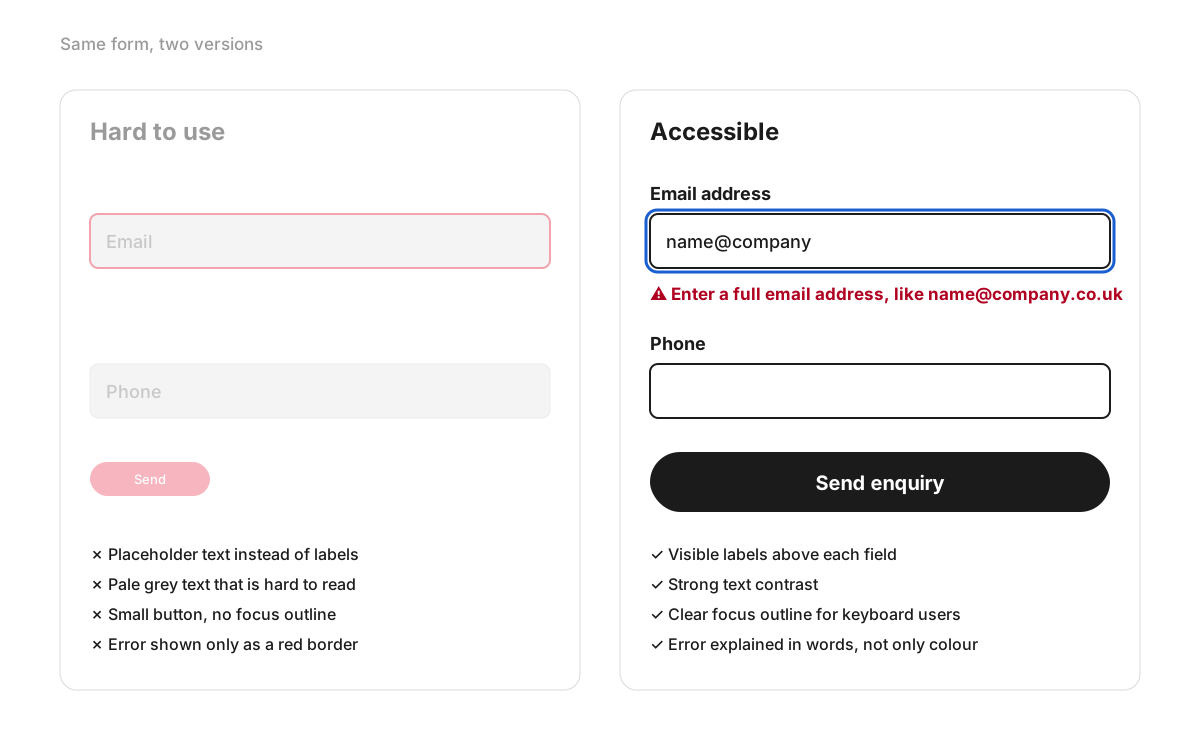
- Understandable. Language is clear, navigation is predictable, and forms say what is wrong and how to fix it.
- Robust. The code is clean enough to work with screen readers and other assistive technology, now and as browsers change.
Checks you can run on your own site today
None of these needs technical knowledge, and together they give a quick first impression of how accessible your site is.
- Put the mouse away. Press Tab to move through your home page and contact form. Can you always see where you are? Can you reach every link and button, open the menu and send the form?
- Zoom in. On a laptop or desktop, set the browser zoom to 400%. A window 1280 CSS pixels wide then behaves like one 320 CSS pixels wide, and WCAG’s Reflow criterion (level AA) expects the content to fit that width without losing information or functions and without scrolling in two directions. Parts that need a two-dimensional layout to make sense, such as maps, diagrams, video and data tables, are exceptions.
- Look at your images. Images that carry information need alt text describing what they show. Purely decorative images should be skipped by screen readers.
- Test the contrast. Run your body text and button colours through a free tool such as WebAIM’s Contrast Checker. At level AA, normal text needs a contrast ratio of at least 4.5:1, and large text at least 3:1.
- Fill in a form badly. Leave a required field empty and submit. Is every field labelled, and does the error message say which field and what to fix?
- Play a video. Does it have captions?
- Read your link text. Links that say “click here” or “read more” make no sense when a screen reader lists them out of context.
- Run an automated test. WAVE from WebAIM and the Lighthouse report built into Chrome’s developer tools both flag common issues. Automated tools catch only part of the picture; keyboard and screen reader testing find the rest.
How to make an existing website accessible
- Find out where you stand. Combine automated testing with manual checks, ideally including someone who uses assistive technology every day.
- Fix the journeys that matter first. The contact form, booking flow or checkout comes before the archive of old news posts.
- Fix templates and components. Often, one fix to the header, a form component or the button style corrects every page that uses it.
- Change editing habits. Whoever adds content needs to write alt text, use headings in order, give links meaningful text and caption videos. Accessibility slips quickly if this is left to chance.
- Check third-party parts. Booking widgets, chat tools, maps and cookie banners are often the least accessible parts of a site, and they still sit on your website, whoever built them.
- Retest after changes, and again after major content updates.
If you are commissioning new work, ask any developer or agency these questions before you sign:
- Which WCAG version and level will the site be designed and tested against?
- How will it be tested: automated tools only, or keyboard and screen reader checks too?
- Will the designs show keyboard focus, error and empty states?
- Will the content management system let editors add alt text and captions, and keep heading structure intact?
- Will you help write an accessibility statement?
A redesign is the easiest moment to build accessibility into a new website, because these answers can be agreed in the brief and checked in the designs before any code is written. The design side of this, from contrast to button sizes, is covered on our user interface (UI) design page.
FAQ
Does an accessibility widget or overlay make my website compliant?
No tool added with a single line of code can rewrite the structure underneath a page, and that is where problems such as unlabelled form fields or menus that cannot be used with a keyboard live. In April 2025 the US Federal Trade Commission approved a final order requiring the overlay provider accessiBe to pay $1 million over claims that its tool could make any website compliant with WCAG.
Do I need an accessibility statement?
GOV.UK guidance requires one from public sector bodies covered by the 2018 regulations. A private business is not required to publish one under those regulations, but a short statement saying which standard you aim for, what you know does not yet work and how people can contact you for help is a useful courtesy to visitors.
What does it mean when a website says “enable accessibility”?
Usually one of two things. Some sites offer an accessibility menu that changes text size, contrast or spacing for the visitor. On sites built with Google’s Flutter framework, “Enable accessibility” is the label of an invisible button for screen reader users: Flutter’s documentation explains that its web accessibility support is off by default for performance reasons and switches on once the button is pressed.
How can I test my website with a screen reader?
Every major platform has one: VoiceOver is built into iPhone and Mac, TalkBack comes with Android, and NVDA is a free screen reader for Windows. Try a simple task, such as finding your opening hours or sending the contact form, and listen for whether headings, links, buttons and form fields are announced clearly.
