
A/B testing, also called split testing, compares two versions of a web page, ad or email by showing each one to a randomly chosen half of the audience at the same time, then measuring which version produces more of a chosen result, such as enquiries, sales or clicks. A result counts only when the gap is too large to be explained by chance.
A split test from start to finish
Take an online furniture shop whose product pages get plenty of visits but fewer orders than the owner expects. Session recordings show people scrolling up and down around the price, and customer emails keep asking about delivery. That gives a hypothesis: showing delivery times next to the price will lead more people to add a sofa to their basket.
Version A is the current page. Version B adds one line under the price with the delivery time. A testing tool sends each visitor to one version at random and keeps them on it if they return. After the planned number of visitors, the shop compares the add-to-basket rate of the two groups. If B is clearly ahead, it becomes the new page. If there is no real difference, that is a result too: delivery information was not what held people back, and the next test can look elsewhere.
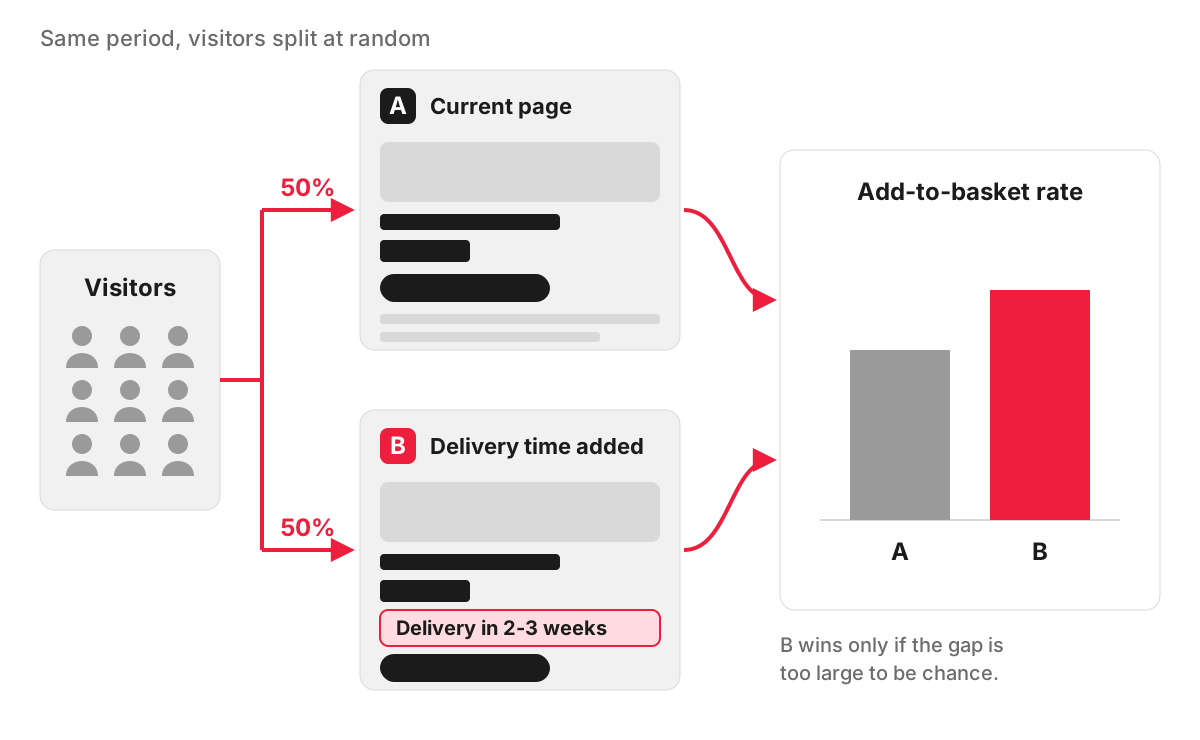
Every reliable test follows the same steps:
- Choose one measure of success before you start, such as completed enquiries or orders.
- Base the change on evidence: analytics, recordings, customer questions.
- Change one thing, or one clearly defined idea, so you know what caused the difference.
- Decide the sample size and the end date in advance.
- Let the test run to that point without touching it.
- Record the result, including tests that showed no difference, so nobody runs them again next year.
Testing more than two versions at once (A/B/n) or several changes in combination (multivariate testing) is possible, but each extra version needs a share of the traffic, so these suit sites with very large audiences.
What you can test
- Web pages: headlines, the order of sections, button wording, form length, how prices are shown, photos, the offer itself. Landing pages that receive paid traffic are a common place to start, because every visit has a cost.
- Ads: in pay-per-click advertising, Google Ads has an experiments feature that splits a campaign’s traffic and budget between the original and a changed version, and Meta Ads Manager has a built-in A/B test option.
- Emails: subject lines, sender name, send time and content. Many email platforms include A/B testing for campaigns; Mailchimp, for example, lets you test one of those four variables at a time.
The smaller the likely effect of a change, the more traffic a test needs to detect it, as the next section shows. A new button colour might shift results slightly; a different offer, headline or a shorter form can shift them enough to measure.
How much traffic a reliable test needs
There is no single figure. The number depends on two things: how often visitors currently convert, and how small a difference you want to be able to detect. What matters is the number of conversions in each version, not page views.
A worked illustration gives a sense of the numbers. Suppose a page converts 3% of visitors and you want to detect a 20% improvement, from 3% to 3.6%. The standard sample-size calculation used by A/B test calculators, at the usual settings of 95% significance and 80% power, gives about 14,000 visitors per version, or 28,000 in total. Halve the improvement you want to detect, to 10%, and the requirement roughly quadruples, to over 53,000 visitors per version. You can check these numbers, or your own, in any free online sample-size calculator.
How long to run the test
Run the test in whole weeks. People behave differently on a Monday morning and a Sunday evening, so a test that covers only part of a week can favour one version by accident. At least one full weekly cycle is the minimum, and most tests need more.
A frequent mistake is stopping as soon as one version looks ahead. Early leads often shrink or reverse, and checking repeatedly for a winner makes a false result far more likely. Avoid running tests across unusual periods, such as a sale or a bank holiday, unless that period is what you are testing, and do not change the pages or the ad budget while a test is live. If the sample you need would take several months to collect, the test is not practical for your site.
When your site has too little traffic for A/B testing
Many small business websites are in this position. An architect’s practice with a few hundred visitors and a dozen enquiries a month would need years to reach numbers like those above. That does not mean improving the site has to be guesswork. These methods work at any traffic level:
- Watch real visits. Session recordings and heatmaps show where people hesitate, rage-click or give up. Microsoft Clarity is free to use; Hotjar is another option.
- Test with a handful of people. Nielsen Norman Group’s long-standing advice is that watching about five people try to complete a task reveals most of the usability problems in a design. Ask them to find a price or book an appointment, and stay quiet while they try.
- Read the funnel in your analytics. Find the page or form step where most people leave.
- Ask the people who talk to customers. The questions your receptionist or sales team answer every day are the gaps on your website.
- Fix what is clearly broken. A form that fails on some phones, a missing price or a slow page on mobile does not need a test.
- Make bolder changes and compare periods. Change the page in a meaningful way, then compare equal periods before and after. Seasonality and changes to ads can distort this, so treat it as a strong signal, not proof.
- Test where the volume is. Ads collect impressions and clicks much faster than a website collects enquiries, so ad copy can often be tested when the page cannot.
This is also where conversion rate optimisation on a smaller site usually begins.
Finding what is worth testing
For a site without the traffic for split tests, our usability audit is often the most useful place to begin. When Microsoft Clarity or Hotjar is installed, it draws on session recordings and heatmaps; when neither is, our team tests the site by hand. Every problem comes with a screenshot and a recommended fix. On a busier site, the same recommendations double as a list of ideas to test.
FAQ
Can A/B testing harm my Google rankings?
Not if it is set up properly. Google Search Central’s guidance on website testing asks you not to show Google different content from what visitors see, to use a canonical tag pointing to the original page if versions sit on separate URLs, to use temporary (302) redirects for any test redirects, and to end the test once you have your answer.
Who uses A/B testing?
Any organisation with enough visitors or recipients to reach a reliable result: online shops testing product pages and checkouts, software companies testing sign-up steps, publishers testing headlines. Smaller businesses mostly use it in ads and email, through the testing tools those platforms already include.
What is an A/B testing framework?
Usually it means a fixed routine a team follows for every test, so results can be compared and trusted. It covers how ideas are written as hypotheses, how they are ranked (for example by expected impact, confidence and effort), what is recorded before launch, and the rules for ending a test and reading the result. Developers also use the term for software libraries that run experiments inside a website or app.
What does statistical significance mean in A/B testing?
It shows whether the gap between the versions is larger than chance would usually produce. At the common 95% level, if the two versions actually performed the same, a gap at least as large as the one measured would appear less than 5% of the time. Significance does not tell you whether the gap is big enough to matter to the business, so look at its size as well.
