
User experience (UX) design is the work of making a website or app easy and pleasant to use: visitors find what they came for, understand what to do next and get it done without friction. On a business website it covers research into who the visitors are, the structure of the site, the journeys through it, and testing those journeys with real people.
What UX work covers on a website project
Most of UX design happens before anything looks finished. On a typical website project it includes:
- Research. Who visits the site and what they are trying to do. The sources are your analytics, the questions customers ask on the phone and by email, the staff who handle enquiries, and the sites your customers compare you with.
- Structure. Which pages the site needs, how they are grouped and what the menu calls them. Labels matter: visitors look for “Prices”, and few will guess that a page called “Investment” holds them.
- User flows. The step-by-step route to each important action, such as requesting a quote, booking a visit or placing an order, including what happens when something goes wrong.
- Wireframes. Plain layouts of the key pages that fix the content and its order before visual design.
- Prototypes. Clickable models used to test the main journeys before development.
- Content and microcopy. Button labels, form hints, error messages and confirmation messages, the small texts that decide whether people finish a task.
- Testing. Watching people use the prototype or the live site, then fixing what slows them down.
How UX shows up in enquiries and sales
Every enquiry or sale is the end of a journey, and each step of that journey can lose people. Take an accountancy practice whose website brings in fewer enquiries than it should. Typical UX problems on such a site would be:
- the phone number appears only in the footer, which mobile visitors rarely reach;
- the services page lists everything the practice does, but says nothing about who each service is for or what it costs;
- the contact form asks for company number, turnover and VAT status before a first conversation;
- a typo in one field clears the whole form;
- after sending, the visitor sees a blank page and has no idea when anyone will reply.
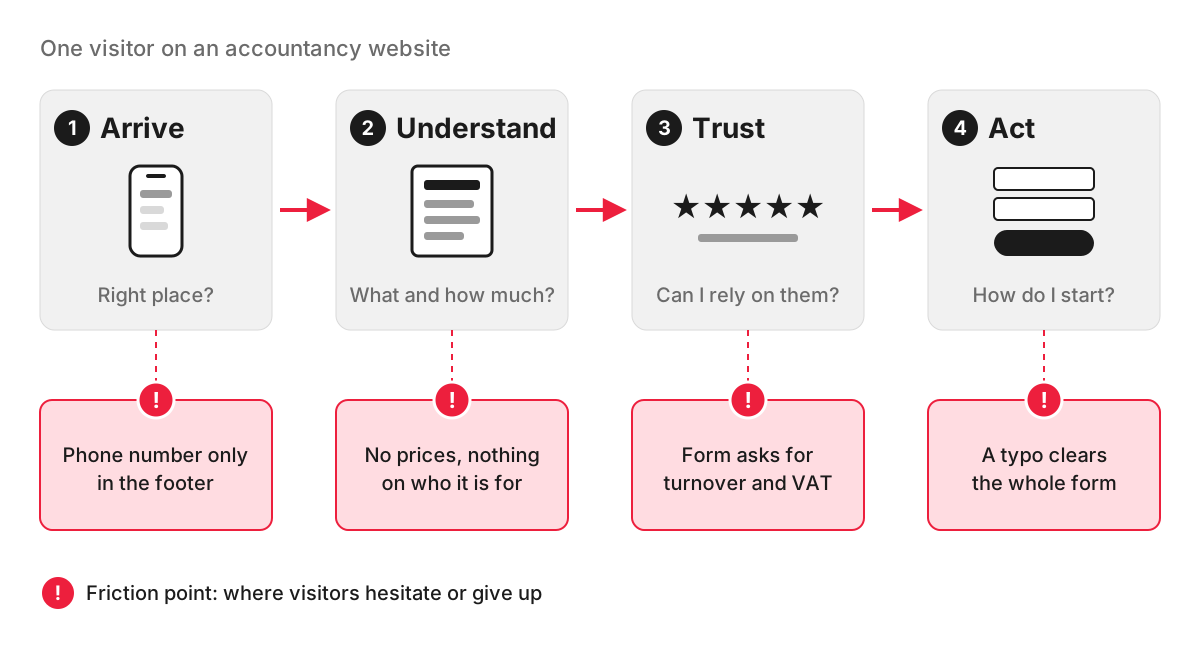
None of these is a design flaw in the visual sense, and the site can look polished while losing enquiries at each point. Fixing them can cost less than buying more traffic, because it improves the result from the visitors you already have. The ongoing work of measuring and improving that result is conversion rate optimisation.
Signs your website has UX problems
You can spot many problems without a specialist:
- Do one task yourself on a phone. Find a price, book a slot or send an enquiry, timing how long it takes and noting every moment of doubt.
- Ask someone outside the business to do the same while you watch in silence. Where they hesitate is where customers hesitate.
- Check your analytics. Look for key pages with many exits, and compare how many people open the contact page with how many send the form.
- Listen to the phone. If people regularly call to ask something the website already covers, the information is there but hard to find.
- Read your site search. The terms people type show what they expected to see in the menu.
- Watch session recordings. Tools such as Microsoft Clarity record visits and build heatmaps of clicks and scrolling. Hotjar, now part of Contentsquare, does the same on sites where it is already installed.
Our UX audits follow the same logic: recordings and heatmaps when either tool is installed on your site, hands-on testing by our team when neither is, and a screenshot of every problem found, each with a recommendation.
How UX differs from UI
UX decides what goes on each page and how visitors move through the site; UI (user interface) design decides how every element looks and responds. The full comparison is on our page about UI design.
UX on our projects
Our team includes a business analyst as well as a web designer: one looks at how your business handles enquiries and orders, the other at how that becomes pages and screens. Wireframes and clickable prototypes for our website projects are made in Figma, and that is where the user flows described above are first put to the test. Our approach to designing a site around its users is set out on the website design page.
FAQ
What does a UX designer do?
On a website project, a UX designer turns what is known about your visitors into the plan of the site. The usual deliverables are a site map, user flows for the key actions, wireframes, a clickable prototype and notes from testing it, which the UI designer and the developers then work from. In smaller teams one designer often covers both UX and UI.
Is UX design like graphic design?
They overlap, but they answer different questions. Graphic design is visual communication: logos, typography, imagery and layouts for print and screen. UX design is about behaviour, meaning whether people can find, understand and complete what they came to do, and its results are measured in tasks people complete. Visual skills help a UX designer, but much of the work happens before anything is styled.
What is the difference between user experience and usability?
Usability is one part of user experience. Nielsen Norman Group defines user experience as all aspects of a person’s interaction with a company, its services and its products, and treats usability as a narrower quality of the interface: how easy it is to learn and how efficiently people can use it. A site can be easy to use and still give a poor experience if, for example, the prices are unclear or nobody replies to the enquiry.
Does good UX help SEO?
Indirectly. Google says its core ranking systems look to reward content that provides a good page experience, but that there is no single page experience signal and that relevance comes first. Good UX matters more for what happens after the click: visitors who find their answer quickly are the ones who go on to enquire.
