
A wireframe is a simple, usually grey-and-white layout of a web page that shows what goes where: navigation, headings, text, images, buttons and forms, and the order in which a visitor meets them. It leaves out colours, fonts and final images, so everyone can agree on the structure of a page before visual design begins.
What a website wireframe shows and leaves out
Think of it as a floor plan. It tells you which rooms there are and how they connect, without choosing the wallpaper.
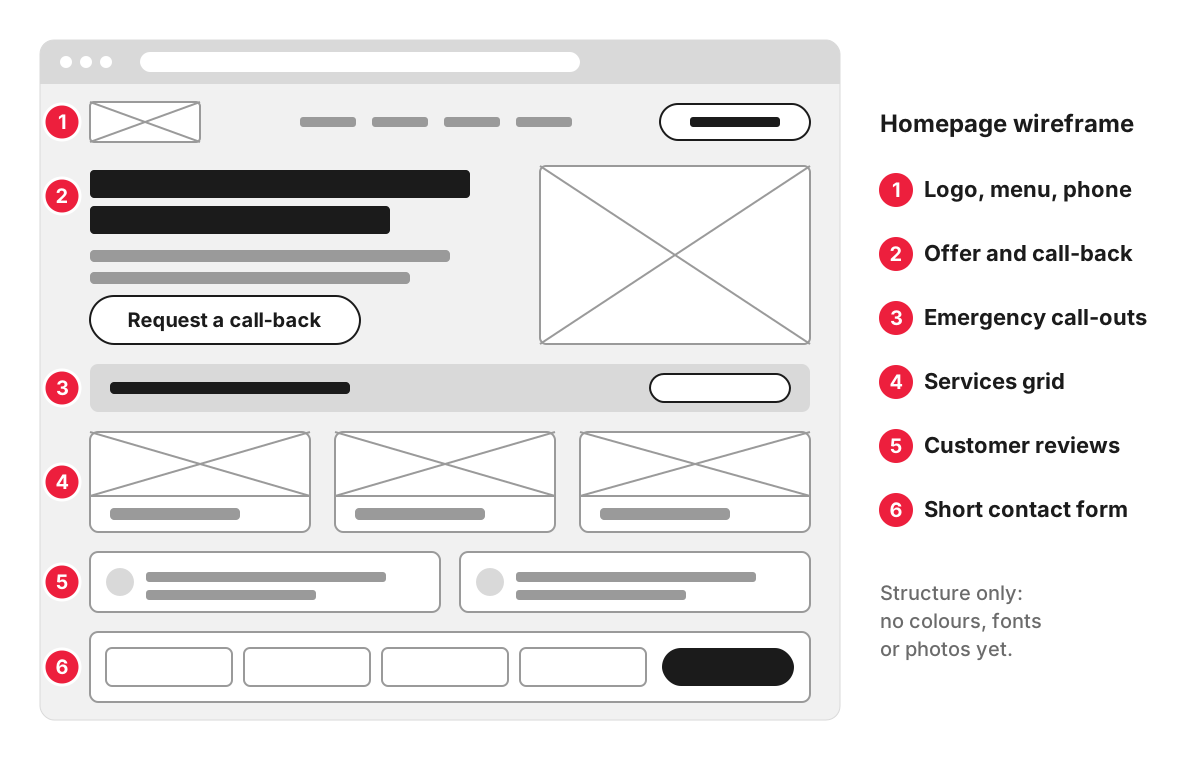
Take the homepage of a plumbing and heating firm. Its wireframe might show, from top to bottom:
- a header with the logo, the menu and the phone number;
- a first screen with a one-line description of the service, the areas covered and a “Request a call-back” button;
- a block for emergency call-outs;
- a grid of services, each linking to its own page;
- reviews from customers;
- a short contact form with name, phone, postcode and a description of the problem.
A second wireframe shows the same page on a phone, where the menu folds away and a click-to-call button stays at the top of the screen.
What the wireframe leaves out is just as deliberate: brand colours, typefaces, photography, icons and animation. Text is often a placeholder or a rough draft, with notes on what each block should say. With the styling stripped away, the conversation stays on the questions that matter at this stage: is anything missing, is the order right, and can a visitor find the next step.
Wireframe, mockup and prototype: how they differ
These three words describe stages that build on each other, and they are often used loosely.
- Wireframe. Structure only. A static, low-detail layout that answers “what is on this page and in what order”.
- Mockup. A static, full-detail picture of the page as it will look: brand colours, fonts, real images and final copy. It answers “what will this look like”.
- Prototype. A clickable model of several pages linked together, so you can open the menu, press buttons and move through a form. It answers “how will this work”. A prototype can be built from wireframes (low fidelity) or from finished designs (high fidelity). More on that in our page on prototyping.
On a typical website project, wireframes are approved first, the visual design turns them into mockups, and a prototype is used to test the key journeys at whichever stage they need testing.
Is wireframing part of UX or UI?
Wireframing belongs to user experience (UX) design. It decides the structure of a page and the route a visitor takes through the site. User interface (UI) design comes after it and decides how each element looks and responds. In smaller teams the same designer often does both.
Why wireframes come before design
The main reason is the cost of change. Moving a block on a wireframe takes minutes. Moving it after the design is drawn means redrawing several screens for desktop, tablet and mobile. Moving it after development means changing code and testing again.
Wireframes also bring disagreements to the surface early. A business owner may expect prices on the homepage, a sales manager may want a long form to qualify leads, and a designer may want a cleaner first screen. A grey layout makes these choices visible while they are still easy to settle.
When you review wireframes, check:
- that every page and block from your brief is there;
- that the most important action on each page is easy to find;
- that the mobile version keeps the things people need on a phone near the top;
- that forms ask only for what you will actually use.
Comments on colours and fonts are best kept for the design stage, when those choices are made.
How a wireframe is made
A wireframe usually starts from the page list and requirements in the technical specification or the brief. Designers sketch the main page types on paper or a whiteboard, then draw them in a design tool such as Figma or Balsamiq. One wireframe is made for each page template, and pages that share a layout reuse it.
In our website design process, we make wireframes and clickable prototypes in Figma, so you can approve the structure of the site by clicking through it.
FAQ
What is the difference between a sitemap and a wireframe?
A sitemap lists every page of the site and shows how the pages are grouped and linked, usually as a tree. A wireframe zooms into one page and shows what sits on it and in what order. The sitemap comes first, because it tells the designer which page templates need a wireframe.
What is a low-fidelity wireframe?
A low-fidelity wireframe is a rough sketch: boxes for images, lines for text, labels for buttons, often drawn on paper or a whiteboard in minutes. A high-fidelity wireframe is drawn to scale in a design tool, with real headings, draft copy and exact spacing, though still without brand styling. Teams usually sketch at low fidelity to compare ideas and switch to high fidelity for the version you approve.
Do I need wireframes for a small website?
For a site of a handful of pages on a proven layout, a quick wireframe of the homepage and one inner page may be all you need. It still pays to see the structure before design, because even a small site has a main action that has to be easy to find. The more pages, forms and user types a site has, the more templates need their own wireframe.
Can I sketch my own wireframe before talking to an agency?
Yes, and it often helps. A rough sketch of your homepage on paper shows what you consider most important, in the order you would show it to a customer. Send it with your brief as a starting point, and expect the designer to change it once they have looked at your visitors and competitors.
