
Prototyping in web design means building a clickable model of a website before it is developed. You can open the menu, move between pages, press buttons and step through a form as if the site were live, although nothing behind it works yet. It lets a business test how the site will be used while changes are still made in a design file.
How detailed a prototype needs to be
Prototypes are usually described by their fidelity, meaning how close they are to the finished site.
- Low fidelity. Grey boxes and placeholder text, often built straight from the wireframes and linked together. Quick to make and quick to change, good for testing structure and navigation.
- High fidelity. Built from the finished designs, with real colours, images and copy. It looks like the final site, which makes it useful for sign-off and for testing with people outside the project, who may find grey boxes hard to judge.
- Interactive detail. Either kind can include states that a static picture cannot show: an open dropdown, a form error, a filled basket, a confirmation message.
What makes any of these a prototype is that you can click through it. A wireframe shows the layout of a single page; a prototype connects pages so you can follow a journey from start to finish.
What you can test on a website prototype
Imagine a business letting holiday cottages in the Cotswolds. Before paying for development, it can use a prototype to answer questions such as:
- Can a guest find a cottage that sleeps six and allows dogs, and see whether it is free on their dates?
- Is the full price, with cleaning fee and deposit, clear before the booking form?
- How many steps does booking take, and is any of them unnecessary?
- Do the menu labels make sense to someone who has never seen the site?
- On a phone, is the “Check availability” button where a thumb expects it?
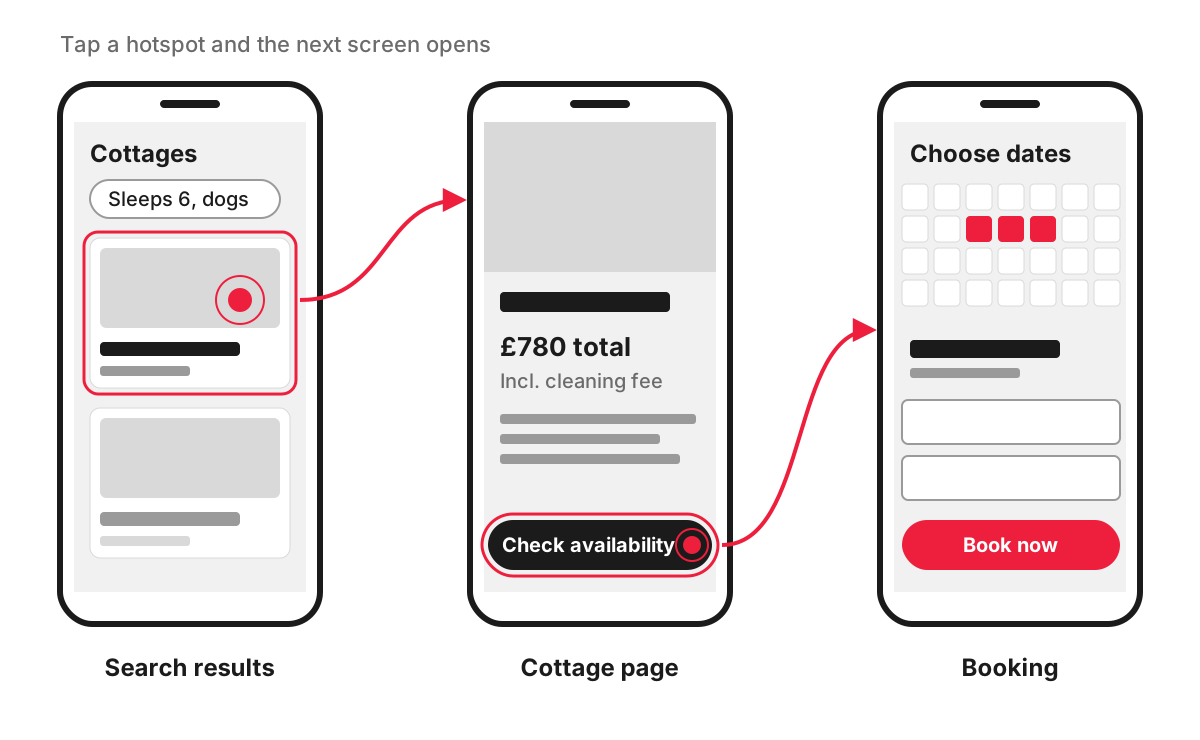
The usual method is simple. Give a few people who resemble your customers a task, watch them try it without helping, and note on which screen they hesitate, go back or give up. That list becomes the next round of design changes.
A prototype also helps inside the business. When the owner, the marketing lead and the person who answers the phone click through the same model, they are reacting to the same thing, and the version everyone agrees on can be recorded in the technical specification.
What a prototype cannot tell you
A prototype is a model, so some questions have to wait for the real build. It does not show how fast pages will load, how the site behaves with your real product or booking data, how easy the admin panel is for your staff, or how the pages will perform in search. Plan to test those on a staging version of the site before launch.
When a prototype is worth it
A clickable prototype earns its cost when the site has journeys that are expensive to get wrong:
- online booking, ordering or checkout;
- customer accounts, portals and dashboards;
- forms with several steps or conditional questions;
- a new product or service where nobody yet knows how customers will behave;
- several people who need to approve the site and may picture it differently.
For a small brochure site of a few pages built on a familiar layout, approved wireframes and designs may be enough, and a full prototype adds less.
On our website design projects, we make clickable prototypes in Figma, so you can try the key pages and journeys before development starts.
FAQ
What are the four types of prototyping?
There is no single official list. One common classification, taken from software development, names four types: throwaway (or rapid), evolutionary, incremental and extreme prototyping. Throwaway prototypes are built to learn something and then discarded; evolutionary ones are refined step by step into the final product; incremental prototyping builds separate parts and joins them; extreme prototyping is a staged method used for web applications. For a business website, the more useful question is the fidelity described above.
How many people should test a website prototype?
Usually only a handful per round. Nielsen Norman Group’s well-known analysis found that testing with five users uncovers most usability problems, and recommends several small rounds with fixes in between over one large study. If your site serves very different groups, such as buyers and suppliers, test a few people from each group.
Can a prototype be turned into the finished website?
Not directly. A design prototype shows how the site should look and behave, and developers then build the real front end and the backend that makes it work. Even a prototype made in code is usually not fit for a live site: the GOV.UK Service Manual warns teams not to copy prototype code into production, because it is not built for security or performance.
What is the difference between a prototype and an MVP?
A prototype is a model you test before development; nobody can actually buy, book or sign up through it. An MVP, or minimum viable product, is a real, working first version with only the essential features, released to real customers to see how they use it. A prototype often comes first and helps decide what the MVP should include.
