
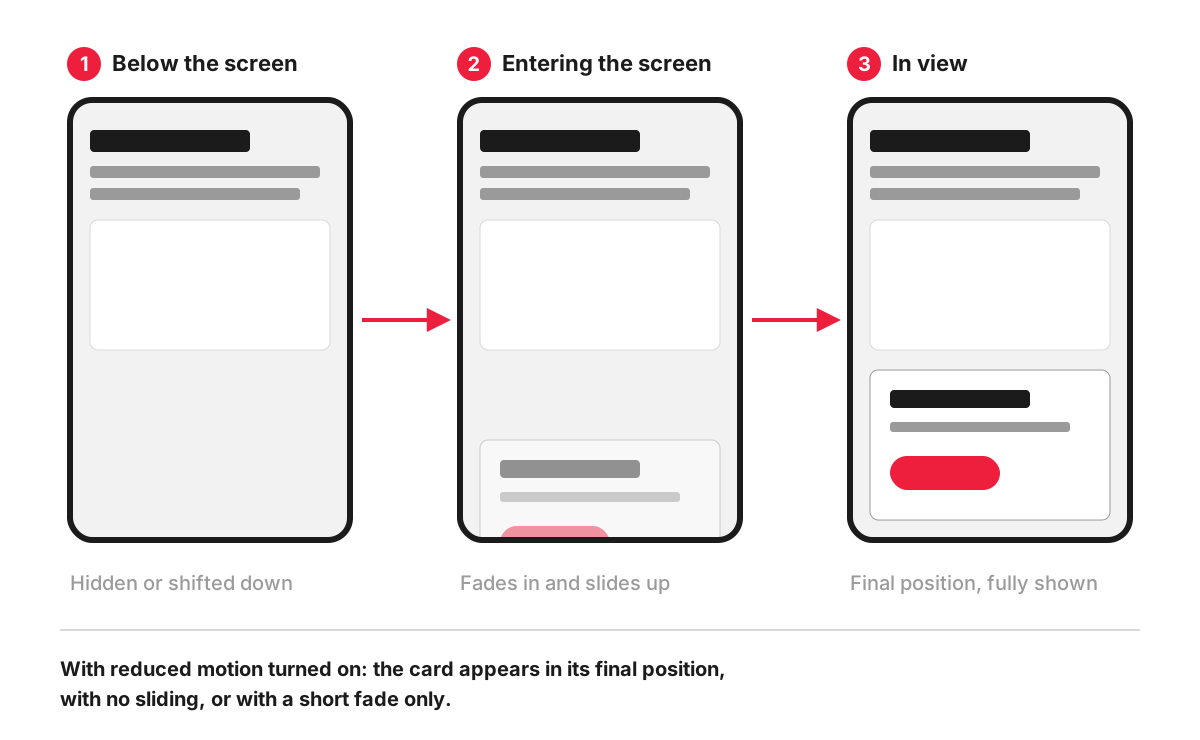
Scroll animations are visual effects on a web page that are started or controlled by scrolling. The most common is the reveal, where a block fades in and slides into place as it comes onto the screen. Others include progress bars that fill as you read, numbers that count up, images that zoom or change as you scroll past, sections that stay pinned while their content changes, and the parallax effect.
Done with restraint, they guide attention and make a sequence easier to follow. Done everywhere, they slow visitors down, and for some people they cause real discomfort.
Triggered and scroll-linked animations
There are two kinds, and the difference matters for how they feel and how they are built.
- Triggered animations start when an element reaches a certain point on the screen, then play on their own over a fixed time, for example a card fading in over 0.4 seconds. Scrolling only decides when they begin.
- Scroll-linked animations are tied to the scroll position itself. Scroll halfway through a section and the animation is halfway through; scroll back and it runs backwards. Reading progress bars and most parallax effects work this way.
How scroll animations are built
With the Intersection Observer API. This browser feature reports when an element enters or leaves the visible area, so a script can start an animation only when the visitor is about to see it. A simple reveal adds a class when the element appears and lets CSS do the animation:
const reduce = window.matchMedia('(prefers-reduced-motion: reduce)').matches;

if (!reduce && 'IntersectionObserver' in window) {
  document.documentElement.classList.add('reveal-on');
  const io = new IntersectionObserver((entries) => {
    entries.forEach((entry) => {
      if (entry.isIntersecting) {
        entry.target.classList.add('is-visible');
        io.unobserve(entry.target);
      }
    });
  }, { threshold: 0.2 });
  document.querySelectorAll('.reveal').forEach((el) => io.observe(el));
}
.reveal-on .reveal { opacity: 0; transform: translateY(24px); transition: opacity .4s, transform .4s; }
.reveal-on .reveal.is-visible { opacity: 1; transform: none; }Note the order: content is hidden only after the script has confirmed it can reveal it again and that the visitor has not asked for less motion. If the script fails to load, everything stays visible.
With CSS scroll-driven animations. Newer CSS lets an animation follow a scroll-based timeline without JavaScript, which suits scroll-linked effects such as progress bars. MDN marks the key animation-timeline property as having limited availability, so the page must work in browsers that ignore it.
With animation libraries. Many sites use ready-made JavaScript libraries or page builder settings. They are quick to add, but each one adds code to download, and their defaults do not always respect reduced-motion settings, so they need checking.
When scroll animation helps, and when it hurts
It helps when movement carries meaning: a process explained step by step as you scroll, a before-and-after comparison, a progress bar on a long guide, or a single reveal that draws the eye to a key figure or the main button.
It hurts when every block on every page fades in. Visitors who scroll quickly meet empty space and have to wait for content to catch up. Text that appears in pieces is harder to read. And movement that pulls attention away from the offer or the form works against conversion rate optimisation. An effect that only looks good in a demo should be judged by whether it helps a visitor find, understand or do something.
Accessibility
Two WCAG success criteria apply directly:
- 2.3.3 Animation from Interactions (Level AAA). Motion triggered by an interaction, and scrolling counts, should be possible to disable unless it is essential. The W3C explains that such motion can trigger vestibular disorders.
- 2.2.2 Pause, Stop, Hide (Level A). Moving, blinking or scrolling content that starts automatically, lasts more than five seconds and is shown alongside other content needs a way to pause, stop or hide it. This catches animations that a scroll sets off and that then keep looping, such as a moving background or an auto-playing carousel.
The practical answer to both is the prefers-reduced-motion media feature, which reads the visitor’s operating system setting for reduced motion. For those visitors, content should appear straight away in its final position; a short fade is usually acceptable. The wider standard is covered in our entry on web accessibility.
Performance and Core Web Vitals
Scroll animations can damage the measurements Google reports as Core Web Vitals:
- Largest Contentful Paint. web.dev notes that elements with an opacity of 0 are not counted as the largest visible element. If the hero headline or image fades in, the page is treated as loaded later than it looks. Content on the first screen should not be animated in.
- Cumulative Layout Shift. Animating
height,topor margins pushes other content around. The web.dev guide to CLS points out that the CSStransformproperty lets you animate elements without triggering layout shifts. - Smoothness. Sticking to
transformandopacitykeeps the work light for the browser; animating other properties on every scroll makes pages stutter on slower phones.
How we work with it
In our web development projects, which sections should move, if any, is agreed at the wireframe and prototype stage in Figma. Before launch, every page is tested across browsers and devices and optimised for loading speed, which is where heavy or jerky animations get caught.
FAQ
What is the name for the scroll animation used on websites?
The most common one is usually called a scroll reveal or fade-in on scroll. Others have their own names: parallax for layers moving at different speeds, scroll-linked or scroll-driven animation for effects tied to scroll position, and scrollytelling for long pages that tell a story through a sequence of animated sections.
What is scrolljacking?
Scrolljacking is when a page takes control of scrolling, changing its speed or even its direction. Nielsen Norman Group defines it as a pattern that changes the speed and, sometimes, the direction of scrolling, and its research found that it is likely to cause disorientation and frustration. Animations that react to normal scrolling are far less risky than ones that override it.
Do scroll animations hurt SEO?
Not by themselves. Search engines read the text in the page whether or not it fades in. The risk is indirect: animations that delay the main content or shift the layout make Core Web Vitals worse, and Google says that good Core Web Vitals align with what its core ranking systems seek to reward.
Can I add scroll animations to a WordPress site?
Yes. Many WordPress themes and page builders include entrance animations, and plugins add more. Before switching them on across the site, check that they respect the reduced-motion setting, that they do not animate the first screen, and that the page still loads quickly on a phone. How the animations look and behave is also part of the site’s user interface.
