
A mobile app developer designs, builds, tests and publishes applications for smartphones and tablets, usually for Apple’s iOS and Google’s Android. On a business project the job goes beyond the app screens: it includes the server and data the app connects to, the release through the App Store and Google Play, and the updates that keep the app working as phones and operating systems change.
What the work covers on a business app
Take a chain of dog groomers that wants an app where customers book appointments, pay deposits, store their dogs’ details and get reminders. A developer, or a small team, would handle:
- Scope and specification. Which features go into the first release, which wait, and how the app connects to the booking system the salons already use. This is written down in a technical specification.
- Interface design. Screens designed for thumbs and small displays, following the conventions people expect on iPhone and on Android. This is UX design work, usually tested on a clickable prototype first.
- The app itself. The code that runs on the phone: screens, navigation, offline behaviour, push notifications, camera or location where needed.
- The back end. Accounts, bookings, payments and staff calendars live on a server, and the app talks to it through an API, often a REST API. If the business already has a website with bookings, the app and the site can share the same backend.
- Testing. On real devices, on older and newer phones, on slow connections.
- Store release. Store listings, screenshots, privacy details and the review process on each store.
- Maintenance. Fixes, new features and updates for each new version of iOS and Android.
Some developers cover all of this; others specialise in the app code and work with a designer and a back-end developer. When you compare quotes, check which of these parts each one includes.
Native or cross-platform apps
This is the main technical choice, and it affects cost, speed and who can maintain the app later.
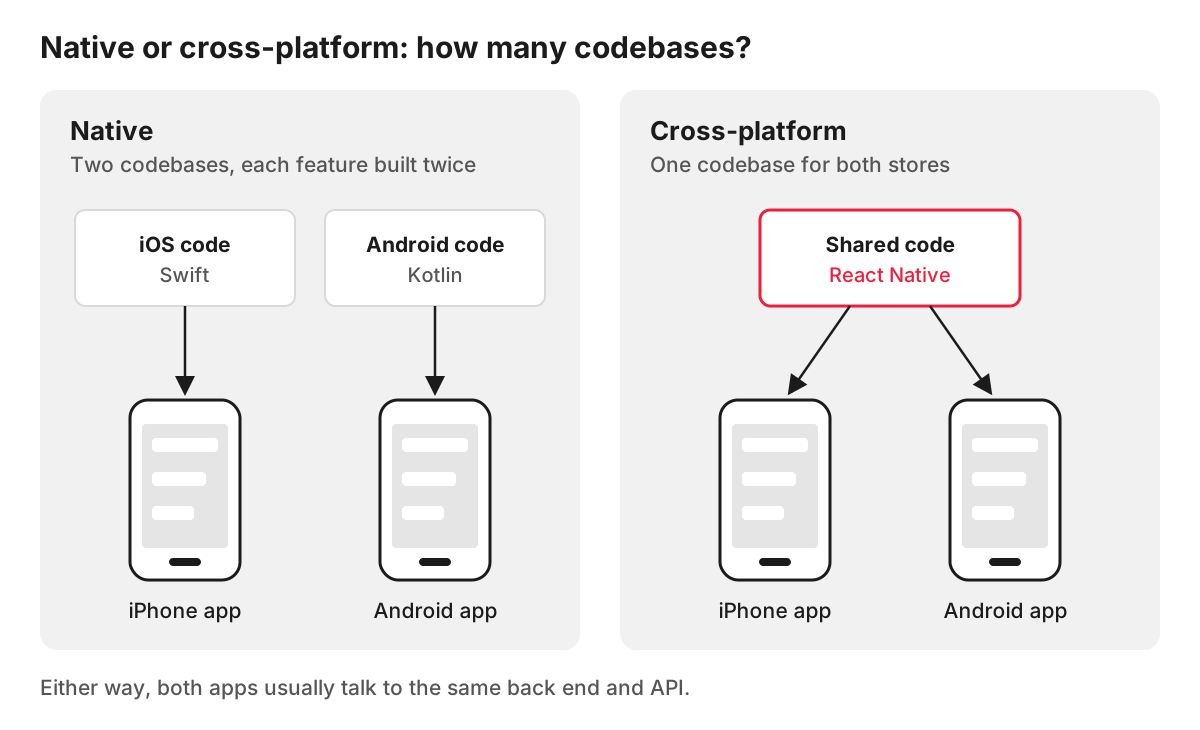
Native apps are written separately for each platform, in the languages the platform owners provide. For Apple devices that is Swift, and for Android it is usually Kotlin, which Google says is used by over 60% of professional Android developers. Native code gives full access to every device feature from day one, and suits apps with heavy graphics, complex hardware use or very demanding performance. It also means two codebases, often two developers, and every feature built twice.
Cross-platform apps are written once and run on both platforms. React Native is a widely used framework for this: Meta released it in 2015, and its official site explains that its components render to the platform’s native interface, so the app uses the same native platform APIs as other apps. Flutter, from Google, is another common option. For most business apps, such as bookings, ordering, loyalty schemes, client portals and staff tools, one cross-platform codebase gives two store apps at a lower cost of building and maintaining them.
An app or a mobile-friendly website?
Many people searching for a mobile developer actually need a website that works well on a phone. A responsive website adapts to any screen, is found through Google and needs nothing installed.
An app is worth it when people will use it repeatedly and it does something a website cannot do as well: push notifications, offline use, the camera, location in the background, a loyalty card in the pocket. For one-off visits, such as reading about services or making an occasional enquiry, a fast mobile website usually serves customers better and costs less.
Apple makes the same point in its own way. Its App Store Review Guidelines say an app should include features, content and UI that take it beyond a repackaged website, so an app that only wraps your existing site risks rejection.
What to check before you hire a mobile app developer
- Similar apps they have released. Ask for store links, and install them.
- Native or cross-platform, and why. A good developer explains the choice in terms of your app’s features, budget and plans for the next few years.
- Who builds the back end. If the developer only builds the phone app, someone else has to build and host the server side.
- Store accounts in your name. The Apple Developer Program is an annual membership listed at $99, and a Google Play developer account has a one-time US$25 registration fee. Both should be registered to your business, with the developer added as a user, so the app stays yours if you change suppliers.
- Source code and handover. The code should sit in a repository you control, with documentation.
- Support after launch. Platform rules keep moving. From 31 August 2026, for example, Google Play requires new apps and updates to target Android 16 (API level 36) or higher. Ask who handles such updates and how they are priced.
How we build mobile apps
Mobile apps are part of our web and app development work, alongside websites and web applications. We build cross-platform apps for iOS and Android with React Native, from one codebase. Each app project starts with discovery and scoping: business goals, user stories and success metrics.
FAQ
How much does it cost to develop a mobile app?
It depends on the number of screens and features, whether the app needs its own back end or connects to an existing one, the integrations with payments or other systems, and whether it is built natively or cross-platform. A reliable estimate comes after the features of the first release are written down and agreed. Remember the ongoing costs too: store accounts, hosting for the back end and updates for new operating system versions.
Can I develop a mobile app on my own?
For a simple app, no-code app builders make it possible to put something together without programming. They work for prototypes and basic internal tools. Once the app needs payments, integrations with your systems, custom design or careful handling of personal data, the limits of a builder usually show, and working with a developer often turns out cheaper over the life of the app.
What is the difference between a mobile app developer and a web developer?
A web developer builds websites and web applications that run in a browser. A mobile app developer builds apps that are installed from the App Store or Google Play, works with each platform’s tools and device features, and takes the app through store review. The skills overlap more than they used to: React Native uses JavaScript and React, so a web developer with React experience can move into app work, and both often connect to the same back end.
Is a progressive web app an alternative to a native app?
Sometimes. A progressive web app (PWA) is a website that can be added to the home screen and opened like an app, with some offline use. It needs no store release, but support for features such as push notifications differs between browsers and operating systems, so check the features you need on both iPhone and Android before choosing it over a store app.
