
A favicon is the small square icon that represents a website on a browser tab, in the bookmarks bar and next to the site’s name in search results. The name is short for “favourite icon”. It is usually a simplified version of the business’s logo, such as its initial or symbol, saved as a small image file and linked from the code of every page.
Where a favicon appears
MDN’s definition of a favicon lists the browser tab, the address bar and the bookmarks menu, and notes that most modern browsers have stopped showing it in the address bar. Google can also show it beside the site’s name in search results, and iPhones use a larger version when someone saves the site to their home screen.
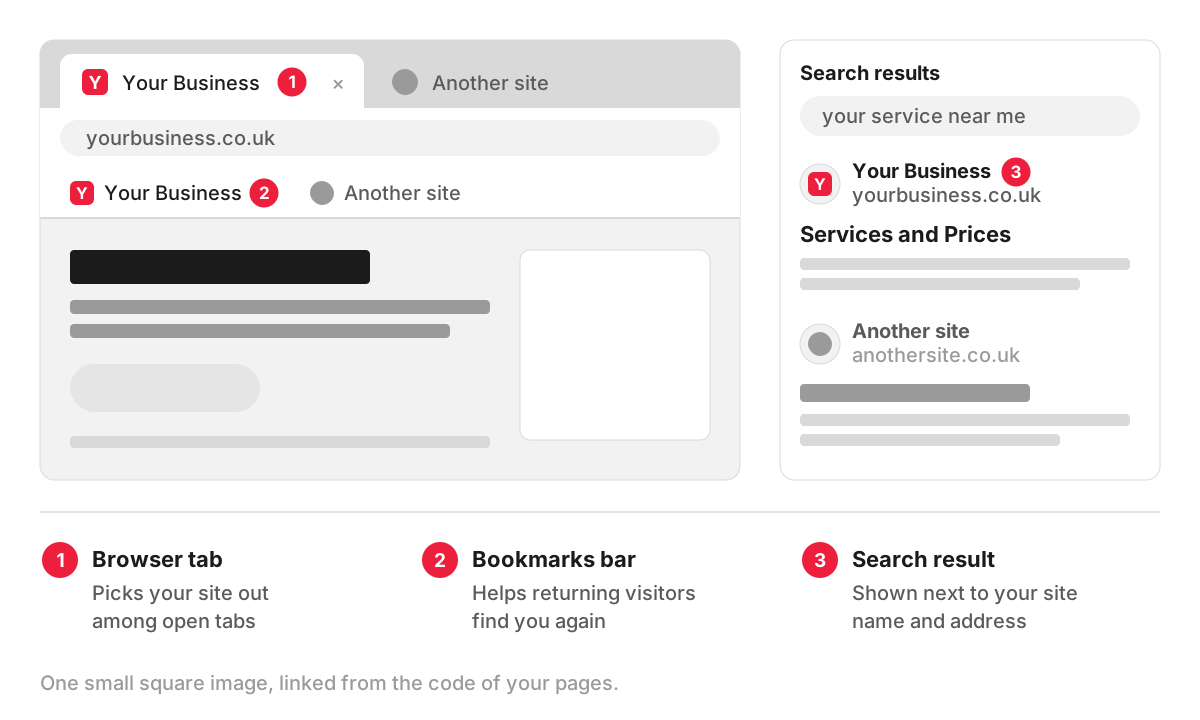
Picture an office manager with a dozen tabs open: the email, the accounts software, two suppliers’ sites and yours. When the tabs shrink to icons, the favicon is the only thing that tells them which one is yours. Without it, the browser shows a generic grey globe or blank page, and the tab looks unfinished.
How Google shows favicons in search results
In the search results, the favicon sits next to the site name and web address at the top of each result, so it is part of the first impression your listing makes, alongside the snippet below it. Google’s favicon guidelines set out what it needs:
- A square image. The icon must have a 1:1 ratio and be at least 8×8 pixels, and Google recommends making it larger than 48×48 pixels so it stays sharp on different screens.
- A supported format. Google lists BMP, GIF, ICO, PNG, JPEG, PPM and TIFF.
- A link on the home page. The icon is declared with a link tag in the head of the home page, and the file’s address should stay stable.
- Access for Google’s crawlers. Googlebot has to be able to crawl the home page, and Googlebot-Image the icon file. Blocking either in robots.txt stops the favicon from appearing.
- One icon per hostname. yoursite.co.uk and shop.yoursite.co.uk can each have their own, but yoursite.co.uk/shop cannot.
- A brand match. The icon should represent your brand. Google replaces icons it considers inappropriate with a default one.
Google picks the icon up when it crawls your home page, the same process that feeds search engine indexing. It says a change can take several days to several weeks to show, depending on how often your site is recrawled, and that meeting every guideline does not guarantee the icon will appear.
How a favicon is added to a website
In the code, a favicon is a line in the head section of each page:
<link rel="icon" href="/favicon.png" sizes="48x48" type="image/png">
<link rel="apple-touch-icon" href="/apple-touch-icon.png">
The first line is the standard rel=”icon” link. When several icons are listed, the browser picks the most suitable by size and type. The second line covers iPhones and iPads, which use the separate apple-touch-icon for the home screen shortcut.
On most platforms you upload an image and the system writes these lines for you:
- WordPress has a Site Icon setting, and its code requests the icon at 512 pixels by default, so upload a square image at least that size.
- Shopify has a favicon field in the theme settings, under Logo or Favicon depending on the theme. Shopify’s favicon instructions recommend 16×16 or 32×32 pixels and note that the Starter plan does not support favicons.
- A custom site or a site on a framework such as Laravel includes the icon files and link tags in its layout template.
What makes a good favicon
A logo that works on a letterhead rarely works at 16 pixels. Fine lines disappear, and text becomes a smudge. Simplify to one strong shape or one or two letters, in your brand colours, with enough contrast to show on both light and dark browser themes. Check it in a real tab at full zoom before approving it, the same way you would review any user interface element.
Common slips are an icon that is not square, so it gets squashed; a full logo with a slogan that nobody can read; a favicon blocked from Google by robots.txt; and a forgotten icon after a rebrand, so the tab still shows the old logo.
Favicons in a redesign or rebrand
When a logo or brand colours change, put the favicon on the same checklist, together with the home screen icon and any social sharing images. It is the piece most often left behind, because nobody looks at it on the design boards. If a new look for your site is on the way, the favicon can go into the brief for our web design services from the start.
FAQ
Is a favicon the same as a logo?
No. The favicon is usually derived from the logo, but it is a separate file designed to be read at a very small size. Many businesses use a symbol or initial from their logo for it, because the full logo would be unreadable.
Does a favicon help SEO?
A favicon does not make a page more relevant to a search, so do not expect it to change your rankings. It does change how your listing looks next to your competitors’, and a clear, recognisable icon gives people one more reason to trust the result they click.
What size should a favicon be?
Make one square master image at 512×512 pixels and let your platform or developer produce the smaller versions from it. Browsers often display it at 16×16 or 32×32 pixels, Google recommends supplying more than 48×48, and home screen icons on phones are larger still.
Why is my favicon not showing in Google?
The most common reasons are that the icon is not declared on the home page, the file or the home page is blocked from Google’s crawlers, the image is not square, or Google has not recrawled the home page yet. You can ask Google to recrawl the home page with the URL Inspection tool in Search Console, then allow a few weeks.
